Running print tool in Workflow 5 Map is blank

While running Run Print activity in Workflow 5, the capture current map shows blank in both Sandbox and Web. The parameters push from workflow to printing but the map does not. We are using an on-premise installation.
-

FWIW, I have the same issue. I opened a support ticket and I can report back if I get a solution.
0 -
Thank you very much.
0 -

This could be related to a proxy issue, or be related to the permissions of the account running Printing.
0 -
For me, I believe it's based on the account being used. By default it uses a local account (VSP_runner), but it should be a domain user: https://docs.vertigisstudio.com/printing/latest/help/Default.htm#rpt5/help/manage-on-prem.htm#service-account
However, when I enter a valid domain user account, the post installer seems to reject it.
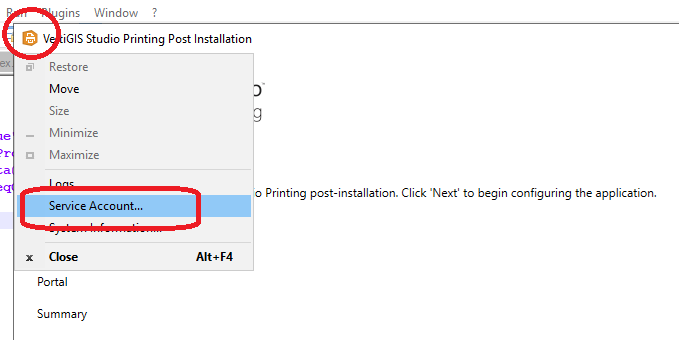 2
2 -
I have a solution!
We used a generic service account and added it to the local administrator group on the server. After applying it to the Post-installer, I needed to recycle the VertigisStudioPrinting IIS application pool.
0 -
Awesome, thank you both for posting on this thread. I will give it a try as well.
0 -
BTW... if this work for you too, you'll need to apply it to the report designer too. We found that while reporting worked for for text, it didn't return a map image (i.e. using the MapPictureBox)
0 -
You can also use the additional log URLs below to get more info
https://{host}/service/job/logs.html#logs?ticket={ticket_from_initial_job/run_request}&topic=PrintLog
https://{host}/service/job/logs.html#logs?ticket={ticket_from_initial_job/run_request}&topic=ExportLog
https://{host}/service/job/logs.html#logs?ticket={ticket_from_initial_job/run_request}&topic=All (combination of the two before)
This log options are not documented here https://docs.vertigisstudio.com/reporting/latest/help/Default.htm#rpt5/help/logs.htm1
Vous devez vous connecter pour laisser un commentaire.
Commentaires
8 commentaires