Overview map pin marker not rendering or behaving oddly

Essentials 4.14.4
Viewer for HTML 4.14.4
Vertigis Studio Printing 5.18.0
Based off 8.5x11 template supplied by VertiGIS.
Overview map scale: 20,000,000. This is roughly a state level view.
Overview map is a portal web map.
Is there a way to set the area of interest pin in the overview map in a print template to use a point or have consistent rendering behavior? The line width on the overview map picture box can change the size of the pin (or polygon, hard to tell what is really).
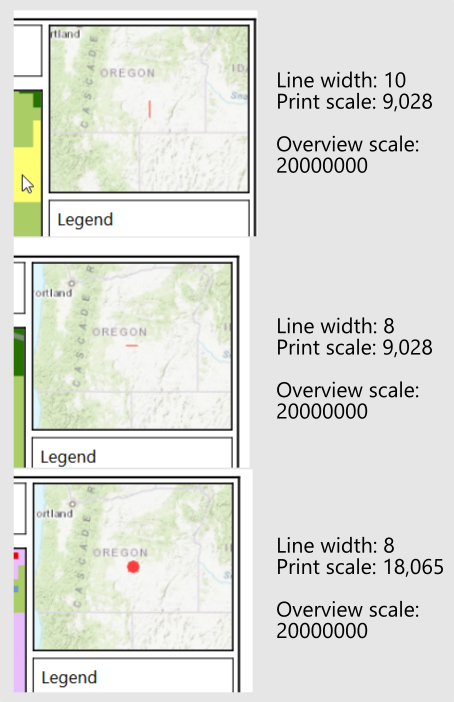
Display of the pin on the overivew map is affected by the scale that the print request. Print requests at 9,028 tend to have problems with the pin in the overview map; the pin will not render, the pin is a vertical line, or the pin is a horizontal line.
If a print request is made at a scale of 18,056, or smaller, the overview map pin works fine when using a line width between 8 - 10. Line width around 12-14 or higher render an odd pin/polygon shape.
Here are some examples of the overview map pin doing odd things.
Vous devez vous connecter pour laisser un commentaire.
Commentaires
0 commentaire