Splash page into VertiGIS studio web
Répondu
Hi All,
I couldn’t figure out if there is a way to insert splash page into VertiGIS studio

Best,
Lubna
-

Nothing exists yet as far as a splash / load feature.
1 -
Dear Cam,
As a workaround solution, I tried to make a workflow that contains an image using display form and enhance the workflow to be exit after some seconds to avoid "the unresponsive behavior of designer", but unfortunately, the workflow didn't work as a splash page,
What your suggestions to enhance it?
{
  "_properties": {
    "isServerWorkflow": false
  },
  "components": [
    {
      "id": 1,
      "steps": [
        {
          "id": 2,
          "inputs": {},
          "position": "0,0",
          "purpose": "start",
          "title": "Start",
          "transitions": [
            {
              "id": 32,
              "inputs": {},
              "position": "90,60 90,150",
              "sourceConnector": "bottom",
              "target": {
                "id": 30
              }
            }
          ]
        },
        {
          "action": "gcx:wf:forms:form:DisplayForm",
          "id": 30,
          "inputs": {
            "form": {
              "accessors": [],
              "code": "resources.forms[values.id]",
              "values": {
                "id": 31
              }
            },
            "reset": true
          },
          "name": "form1",
          "position": "-30,150",
          "title": "Display Form"
        }
      ]
    },
    {
      "id": 8,
      "steps": [
        {
          "id": 9,
          "inputs": {},
          "position": "0,0",
          "purpose": "start",
          "title": "Event",
          "transitions": [
            {
              "id": 20,
              "inputs": {},
              "position": "90,60 90,160 100,160 100,180",
              "target": {
                "id": 19
              }
            }
          ]
        },
        {
          "action": "gcx:wf:core::Delay",
          "id": 19,
          "inputs": {
            "duration": {
              "accessors": [],
              "code": "7000",
              "source": "7000"
            }
          },
          "position": "-20,180",
          "title": "Delay",
          "transitions": [
            {
              "id": 52,
              "inputs": {},
              "position": "100,210 100,350",
              "sourceConnector": "bottom",
              "target": {
                "id": 50
              },
              "targetConnector": "top"
            }
          ]
        },
        {
          "action": "gcx:wf:core::Exit",
          "id": 50,
          "inputs": {},
          "position": "10,350",
          "title": "Exit"
        }
      ],
      "title": "load-image1"
    }
  ],
  "deploymentConfig": {
    "supportedApps": {
      "GWV": true
    }
  },
  "designerVersion": "5.30.1+1",
  "forms": [
    {
      "defaults": {},
      "elements": {
        "footer": {
          "enabled": true,
          "items": {},
          "section": "footer",
          "type": "ButtonBar"
        },
        "header": {
          "section": "header",
          "title": {
            "markdown": ""
          },
          "type": "Header"
        },
        "image1": {
          "enabled": true,
          "index": 0,
          "rowIndex": 0,
          "rowNumber": 0,
          "size": {},
          "titleLocation": "above",
          "type": "Image",
          "value": "https://lubnaj-pc.molg.pna.ps/adaptor/sharing/rest/content/items/93d662926f3d4fc190cf8e330cc63fb5/data"
        }
      },
      "id": 31
    }
  ],
  "licenseInfo": {
    "licenseUrl": "https://lubnaj-pc.molg.pna.ps/vertigisstudio/workflow/service/auth/license"
  },
  "start": {
    "id": 2
  },
  "transitions": [
    {
      "branch": "load$image1",
      "id": 10,
      "inputs": {},
      "source": {
        "id": 30
      },
      "target": {
        "id": 9
      }
    }
  ]
}
0 -
I tried a couple different things.
The one that seemed to work best was to add a dialog (title Splash to keep track of it) and put my content in the dialog.
I then manually modified the layout.xml with an active=true to ensure the dialog shows up as the app loads.
<dialog id="dialog-1dfe141c" config="c8475844-f40f-4374-910d-519621096bd0" active="true"><image id="image-fd86f5ad" config="image-config-1-kssl7ul5ok-ml52vg9ueb"/></dialog>Finally, I added a Hide command for the Splash dialog to the Map Initialized event (in Map component).Result looks something like this: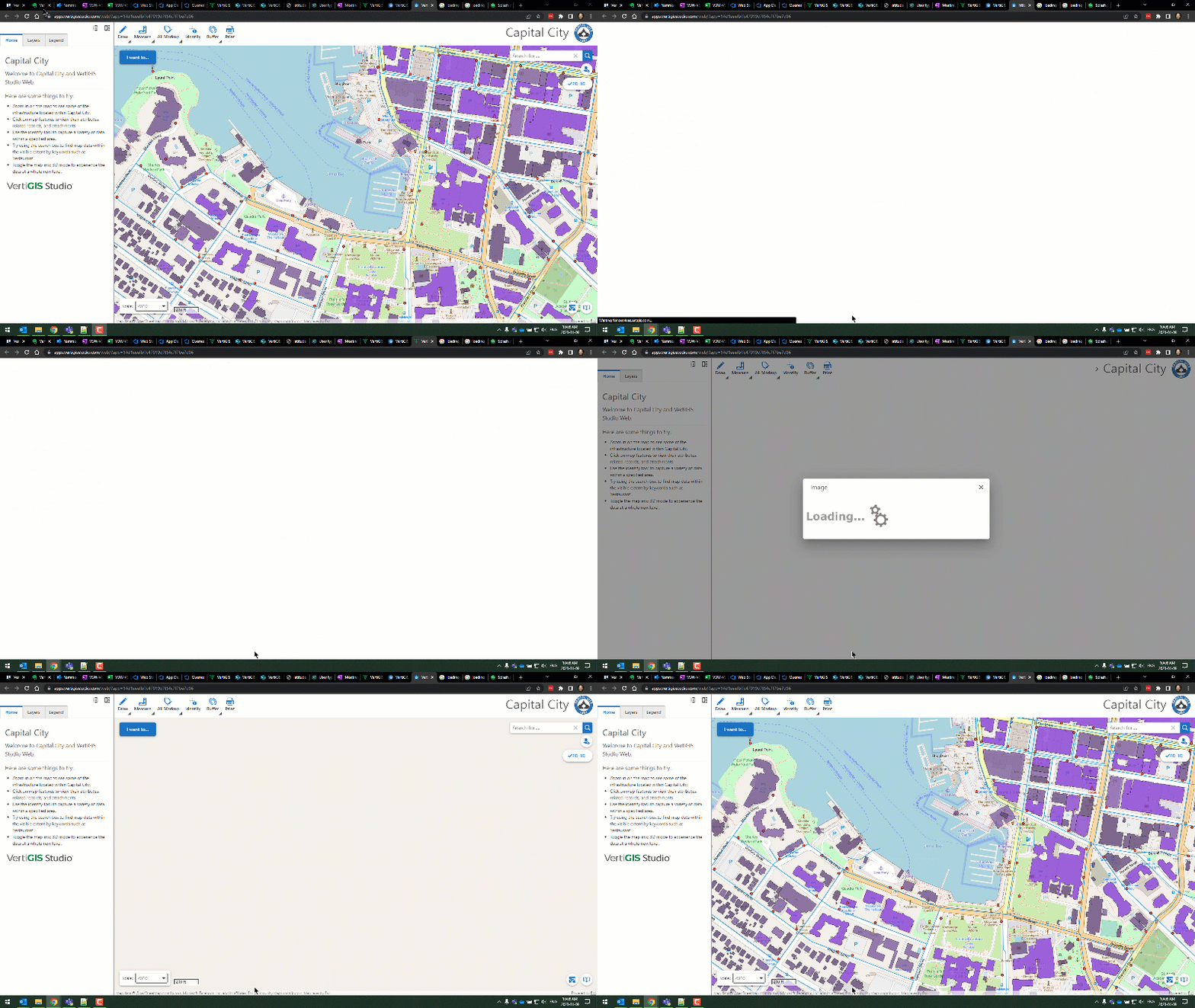 ... of course you can customize the Dialog content with images/text in any way you desire.0
 -

Hi Cam,
Is the SDK needed to edit the layout.xml file?
0 -
Hi James,
No, you can edit it directly (carefully).
I normally use the File Download, make my edits, and then File Upload.
If it is the app.json, you can use Item Manager, but the layout XML is stored in the app.json in such a way that you need to download it to edit it effectively.
Cam
1 -
Thanks Cam! That worked great.
1 -
Thank you Cam Barnard,
Unfortunately, it didn't work with me. What I did simply, is copy the code you have provided as shown in the screenshot below:
Or did you mean edit the blank.xml as I did below but not in layout.xml?
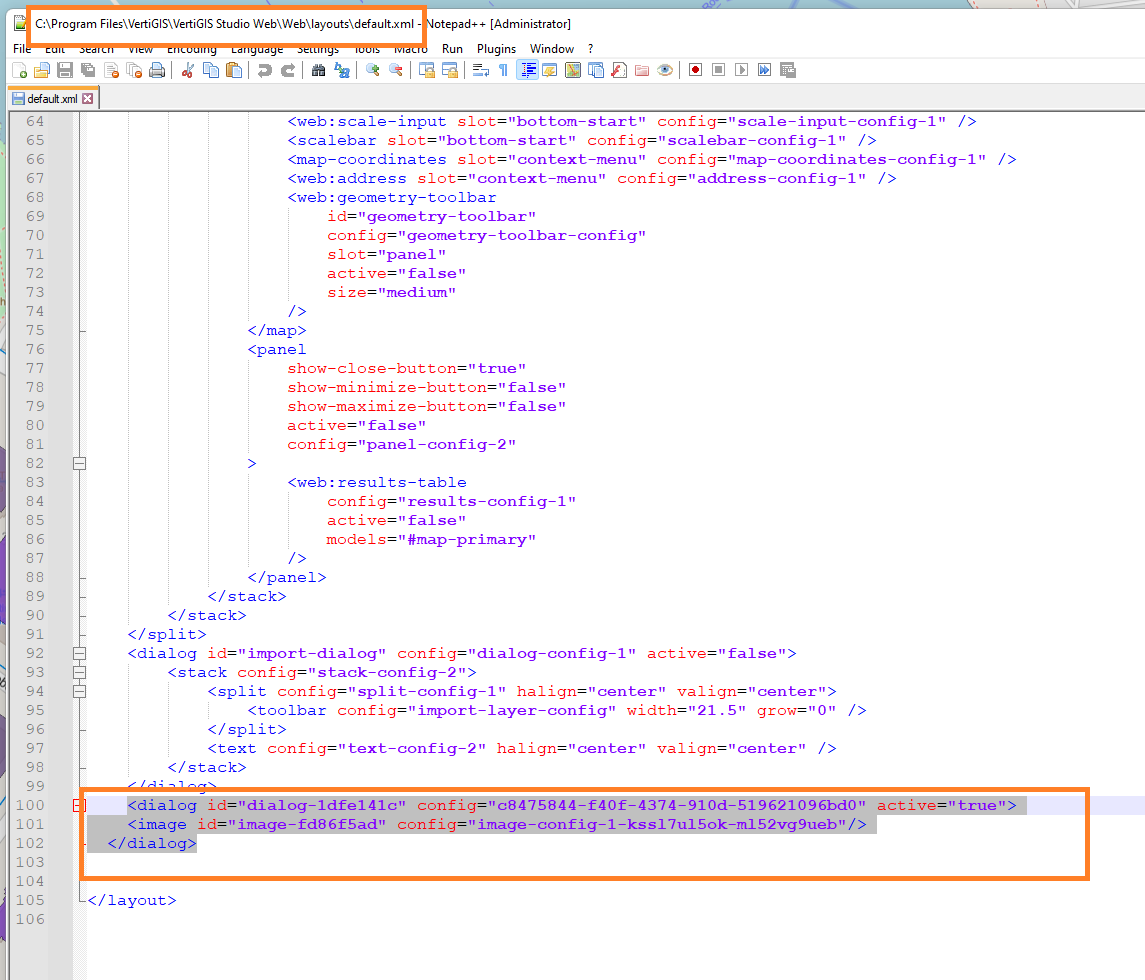
let me know if I am in the wrong way
Thanks in advance
0 -
You have the right idea. You won't be able to use my code block 'as is'. Instead you should add the dialog via Designer and put the content you want in it. Then open the XML file and find the dialog that was generated and add the active="true" to the XML.
The ids generated in your app via Designer will be different from my example (which is why my code 'as is' will not work.
0 -
Thank you Cam Barnard, it works with me
I think implementing it in geocrtex essential better that vertigis, it just attach the image
Best,
Lubna
0
Vous devez vous connecter pour laisser un commentaire.
Commentaires
9 commentaires