How to turn on shared configuration on a component in Vertigis Studio Web?
Répondu
I have two layouts and want to share the Home Panel Information between them?
There is help on how to unlink "Shared Configuration" but none on how to turn it on?
I used the same component names on both layout and noticed that only the Text component is showing "Shared" automatically but the parent components (Rows and Panel) are not. Even that I use the same name for those components.
-

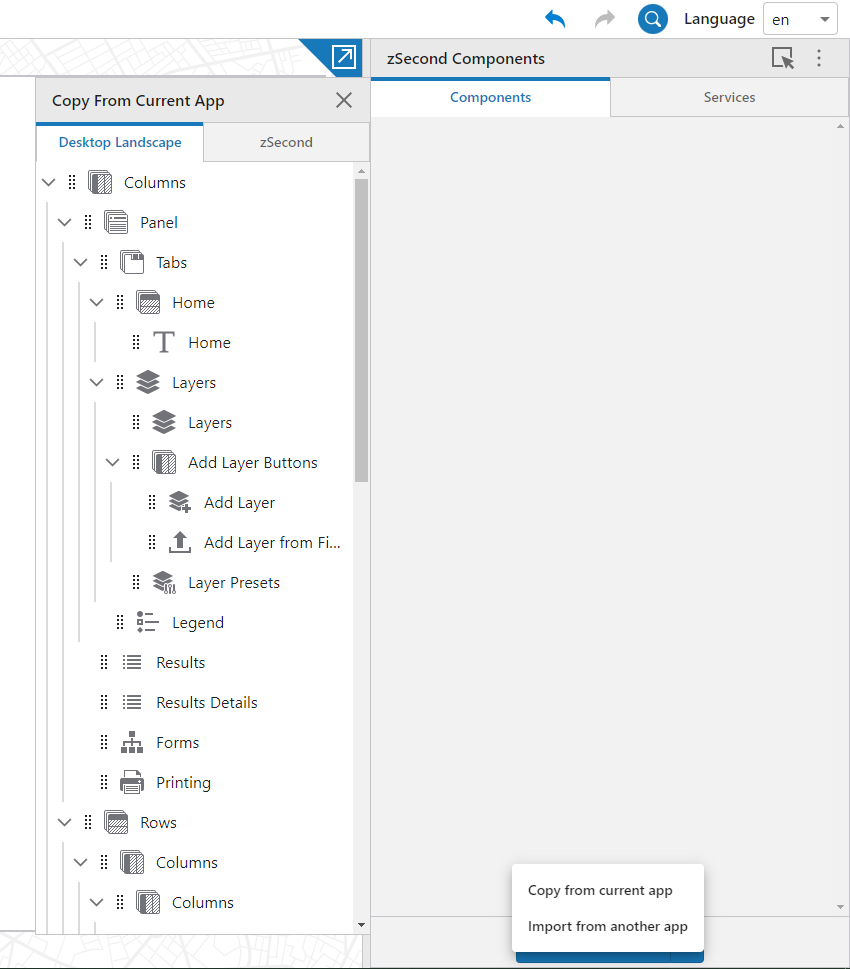
Hi Jenny - it is easy to miss. To the right of the 'add component' button is a 'down arrow' ... that opens a menu where you can choose to copy a component from your current app.
In short, you don't link to components together, you grab the component from the other layout and add it to the layout and they will be linked by default.
 0
0 -

Hi Cam
how do i relink a results list and results table?
i unlinked them and now the switch to results table/List button no longer works.
thanks
shaun
0 -
Shaun Glorie ... nice work, you found the one exception!
Both Results List and Results Table share the same underlying config model, but there isn't a way to do this connection in the interface.
If you open the Web GIS - Default template, save it, File > Download App and crack it open (.zip) in the layout XML you will see entries for results list and results table that look like this:
<results-list active="false" config="results-config-1" show-star-controls="true" id="results-list-39eb5169"/>
<web:results-table config="results-config-1" active="false" models="#map-primary" show-star-controls="true" id="results-table-e9c59d11"/>
Note that both reference the same config (e.g. config="results-config-1")
After you unlink them, one or the other of them will create a copy of the config and update that reference, so you'd see something like this:
<results-list id="results-list-39eb5169" active="false" config="results-config-1-2f34ztpi4j" show-star-controls="true"/>
<results-table xmlns="https://geocortex.com/layout/web/v1" id="results-table-e9c59d11" config="results-config-1" active="false" models="#map-primary" show-star-controls="true"/>
In this example, you'd update the config= for results-list and change it back to config="results-config-1"
Save the layout, Upload that, and the two will be linked once again.
So WHY is this an exception and so challenging?
Early on in Web we wanted to mimic the behavior in GVH where you could switch between results list and results table (may not have been a good idea).
Results List and Results Table is the only example of linked configuration where two different components share the same config model ... and we wanted to keep it simple in terms of the interfaces we provided in Designer to link components by adding the same component type to the same app by default, and then allowing you to unlink them if that isn't what you want.
This left 'linking' of Results List and Results Table as a manual exercise, which thankfully doesn't come up a whole lot.
1 -

Thanks for posting a solution Cam Barnard, that was exactly what I needed!
0
Vous devez vous connecter pour laisser un commentaire.
Commentaires
4 commentaires