Modify order of related tables in results panel
Terminée
RELEASED: Web 5.27
Is there an option to change the order in which related tables are displayed in the results details pane?
In my app, the related table order is neither alphabetical, or based on the order of map service layer Id, or item id. Seems to be random with no option to modify.
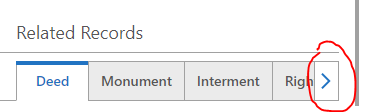
As the related tables names are displayed in horizontal tabs, important related tables are hidden to the right of the > arrow. I'd like the option to move the hidden tables to the front of the list so they are more prominently displayed.
Screenshot below from version 5.22:
0
-

Upcoming changes here where we will respect the order of relationships as defined in the webmap configuration.
0
Vous devez vous connecter pour laisser un commentaire.
Commentaires
1 commentaire