How do Get/Set App Data Work for Application and Global Storage?

I have a use case that some of you probably share: I'd like to have a disclaimer popup on my VSW app, but not every time. If I could get them to show up, say, once a month, that would be lovely.
I've been fighting with the Get/Set Application Data activities in WF because the documentation appears to say that this is the use case for the “application” visibility property as “the value needs to be used in several runs of the current application”. However, I'm never able to retrieve this application data until a given session has already run the Set Data activity.
Furthermore, when I clear the data from my browser tab, or even entire browser, it does not seem to bother the Get App Data activity, which has no trouble pulling up that stored data. From this, I infer that the App Data is stored somewhere in the application instance (I went digging through what I could find through the get-current-layout operation but didn't see anything).
This all leaves me wondering what the visibility levels in the Get/Set Application Data activities are even for. Based on the documentation, I figured that “global” would store a cookie for all VS apps on this site, and “application” would store local data for a given app. Maybe the ArcGIS Item for User settings. I think I was mistaken… or am I just doing it wrong? Does anyone have a way to share data across sessions (without using a table)?
-

In the TypeScript version of Workflow, the “global” and “application” visibility options both write the data to local storage. The only difference is that the name used to save it varies slightly between the two.
However, I see that VertiGIS Studio Web overrides the behaviour of Get/Set/Remove Application Data so it may operate differently there. If you're using Web, this question might be better moved to the Web community.
If you're using Experience Builder, it behaves as I described at the start.
1 -

I can't reproduce the issue you mentioned. Here's a test I had handy already (from a bug we worked on around Web 5.36) that checks all the visibility levels. If it works the same for you as it does on my end, it should demonstrate the difference between the levels:
- Load https://apps.vertigisstudio.com/web/?app=394fa48b01ab414798497a6913a9e6eb&debug=true
- Run the “get” workflow from the I Want To Menu
- All 3 values are shown as undefined
- Run the “set” workflow from the I Want To Menu
- Run the “get” workflow from the I Want To Menu again
- None of the values are shown as undefined
- Open the same app in a new tab or window
- Run the “get” workflow from the I Want To Menu
- Just the “memory level” value is undefined and the other 2 are set
- Load this different app: https://apps.vertigisstudio.com/web/?app=64a033e2c1ad4c6d95689b719a6c0452&debug=true
- Run the “get” workflow from the I Want To Menu
- Just the “global level” value is set and the other 2 are undefined
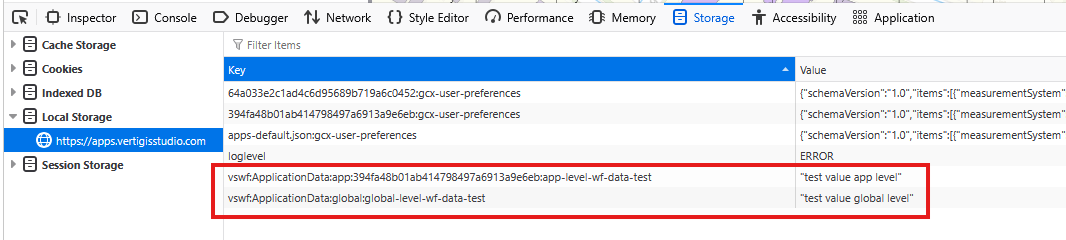
Also, here's where you can find the storage for the “application” and “global” level data in your browser:
Firefox:
Chrome:
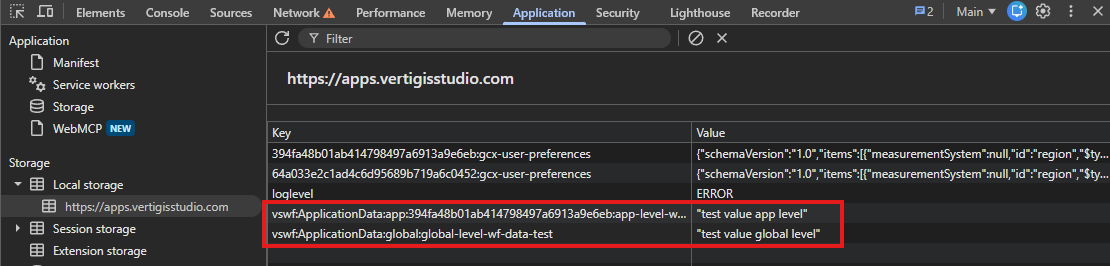
The same storage seems to get used regardless of whether you're signed in to the app or not (ie. it doesn't use the “user preferences” Portal item). And the main difference between levels is that the application-level data includes the app ID in the key.
1
Please sign in to leave a comment.
Comments
2 comments