Layer List expand arrow reappears on Annotation group sublayer after Workflow modifies it, despite layerListSettings.childrenIncluded: false

Hi everyone,
I've run into a tricky Layer List issue with an Annotation group sublayer and hope someone has seen this before.
Environment: VertiGIS Studio Web, ArcGIS Server MapImageLayer with an Annotation group sublayer (e.g. "Gebäude Beschriftung") containing one child sublayer (the actual annotation feature sublayer, e.g. "gebaeude_t_text"). Workflow activities used: gcx:wf:arcgis::GetLayer, gcx:wf:core::SetProperty, gcx:wf:arcgis::RefreshLayer.
Issue: In app.json, the group sublayer's sublayer-extension has layerListSettings: { childrenIncluded: false }. On initial app load this works correctly — no expand arrow shown in the Layer List. But after a Workflow does GetLayer on this sublayer, sets a property (visible/listMode) via SetProperty, and then calls RefreshLayer on the parent MapImageLayer, the expand arrow reappears next to the group sublayer — even though childrenIncluded is unchanged. Clicking the arrow toggles direction but renders no child row, so it's purely a visual artifact.
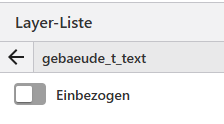
Initial Map load:

After Workflow used:

Tried: Setting listMode: "hide" on the child sublayer itself — no effect on the arrow. Setting sublayers: [] on the parent via SetProperty — removes the arrow, but also removes the rendered annotation text from the map (the group's visible content is apparently drawn from its sublayers collection), so not usable.
Question: Is there a supported way to keep childrenIncluded: false in effect after a Workflow modifies the parent group sublayer and calls RefreshLayer, without losing the annotation rendering?
Please sign in to leave a comment.
Comments
0 comments