CityWorks Activity Pack for VertiGIS studio workflow in Experience builder dev edition

I have followed all the steps in this document: https://github.com/vertigis/workflow-activities-cityworks/blob/main/README.md to add the activity pack to my ArcGIS online environment, and shared it to my organization. Then when I go into VertiGIS workflow designer - i see in the activity packs the “Cityworks REST API” and have installed it. The activities are now available to drag/drop into my workflow. The issue I am having is in my Experience Builder dev edition environment, I run the workflow and I get this attached error. I am not sure how to deal with this. How do i get my vertigis-tools to recognize it in Experience Builder dev edition?

-

I'm experiencing the same issue, but with other custom activity packs:
- ArcGIS Maps SDK for JavaScript
- Web APIs
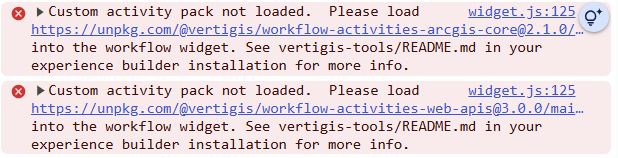
I'm using the VertGIS Studio Workflow Experience Builder Widget, version 2.4.0, on ArcGIS Enterprise 11.5.
Has anyone else managed to get a custom activity pack for Workflow running in Experience Builder?
0 -

Here's some notes I took a couple years ago on the process that's worked for me before (with the developer edition of experience builder specifically):
- Open command prompt on server where ExB is installed
- Run: CD [path to ExB installation]\vertigis-tools
- eg. CD C:\Program Files\ArcGIS\ArcGISExperienceBuilder113\vertigis-tools
- Run: npm run activity-pack add
- Enter the main.js url for your activity pack, and hit enter
- Eg. https://unpkg.com/@vertigis/workflow-activities-web-apis@3.0.0/main.js
- If you're unsure of the URL, use workflow designer to export a workflow that has the custom activity and examine the JSON file. The url, minus "/main.js", should be in there somewhere.
- Eg. https://unpkg.com/@vertigis/workflow-activities-web-apis@3.0.0/main.js
- Shut down and restart both the server and client components of ExB after installing the activity pack
- For servers that are using a windows service to run ExB, this means stopping the windows service, and using command prompts to re-start ExB client and server the same way as described in Esri's install guide. Eg.
- cd C:\Program Files\ArcGIS\ArcGISExperienceBuilder113\server
- npm start
- (then open another new command prompt and repeat for the "client" folder)
- **Restarting the windows service doesn't seem to restart both components, so for the first restart its necessary to use these command prompts instead
- For servers that are using a windows service to run ExB, this means stopping the windows service, and using command prompts to re-start ExB client and server the same way as described in Esri's install guide. Eg.
2 -
txs, i think i have it working without error now. Now i just need to figure out how to get and pass in my token! :)
0
Please sign in to leave a comment.
Comments
3 comments