Map Tip - remove from results available even when feature is not in results

Hi,
I'm struggling a bit with the “remove from result” command when configuring the action menu in the map tip window when a user clicks on a feature in the map. Even if the feature is not already in the selected results the option remove from result is still enabled. I have enabled the “hide when not allowed” function.
Screenshot (in dutch): the selected feature is not in the result list of 12. But still “remove from result" is active.

Settings for the command (sorry in dutch, but the hide option when disabled is enabled):

Any ideas how to disable it when a clicked on feature is not in the result list?
-

When I remove a result from the result list, it will not be able to show up as resultdetails (maptip)

After removing from the list:
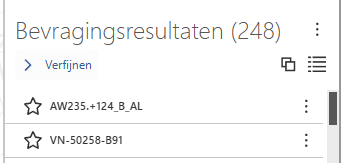
I tried the same thing when I have one result details activated, when I remove from list it wil also not show in the result details page.
Can you explain a bit more what is going wrong in your case?
0 -
Hi Job, yes I see you're referring to the result list menu actions, which work correctly in my case. The thing is about the map tip actions where there is also an option to remove the result, even if you don't have any results or the selected object on the map is not in the current result set.
So to summarize:
1) Result set is empty
2) User clicks on the map on an object from a map layer.
3) The map tip opens and the user opens the map tip menu.
4) There the option to “remove from result” is available, which is strange because the object is not in the result set.
0
Please sign in to leave a comment.
Comments
2 comments