Reusing Previously Deployed Items Across VertiGIS Studio Apps

Hello,
I am working on a three-stage deployment strategy (Dev > Test > Prod) with the following setup:
- Each stage has its own GIS portal, Web Maps, and VertiGIS Studio instance.
- Web apps in each environment are configured to use environment-specific resources (e.g., data on SDEs tied to Dev, Test, or Prod).
- Within each environment, we may have multiple apps (e.g., App 1, App 2, etc.) that share common elements, such as workflows, Web Maps, and printing templates.
When deploying a new app, is it possible to reference an existing deployed item (like a workflow or Web Map) instead of creating a duplicate? For example:
- In the Dev environment, I create Workflow A and use it in multiple apps.
- When moving to Test, I want to deploy the apps while reusing Workflow A (already deployed to Test) instead of creating additional copies.
- The same applies to Web Maps and other shared items.
Currently, each app deployment seems to create its own copy of shared items, even when the items are identical. This results in unnecessary duplication and additional maintenance work, especially across multiple environments.
Is there a way to configure VertiGIS Studio to reuse previously deployed items in such scenarios? If so, what steps do I need to take for achieving this in a cross-environment deployment strategy?
Thanks for any help!
-

Hi Chase,
You should be able to do this by using the Exclude Deployment Items tool in combination with the Environment Values tool. Both of these can be found in the Deploy menu of Web Designer.
First, you can use Exclude Deployment Items to prevent the workflows, web maps, print templates, etc. that have already been deployed in a different app from being deployed again. This will ensure that duplicates are not created.
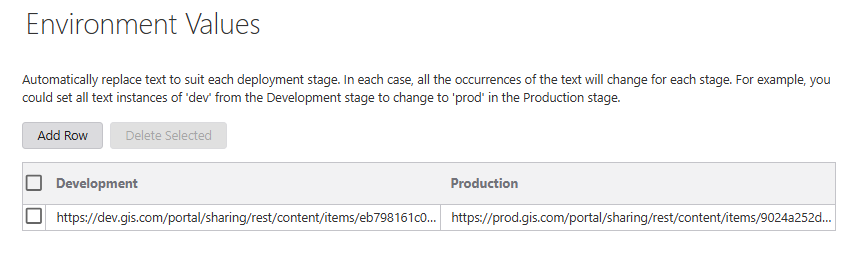
Next, you can use Environment Values to point the deployed app to the correct items. You would do this by adding a new row and specifying the Portal item URL for the item in each deployment stage. This URL needs to match what is stored in your app's JSON. For example:
 1
1
Please sign in to leave a comment.
Comments
1 comment