Toolbar submenu - make a chosen tool active by default

Hi Everyone,
I have a submenu item on my toolbar and it has 4 items in it. How do I set one of those items to be active by default when the submenu is opened?
To get one of the tools to be active, it's now 2 clicks for the user - 1st click to open the submenu and 2nd click to activate a tool. I'm trying to replicate Essentials options when you could have a submenu item but there was a default tool you could use without even having to expand the submenu (eg identify point). Only if you wanted to swap to something that wasn't a default did you need to expand the submenu (eg swap to identify by polygon or line). Is this same configuration possible? I can't see a way to even make an item within the submenu active on opening the submenu, let alone having it activated with 1 click and the submenu not having to open.
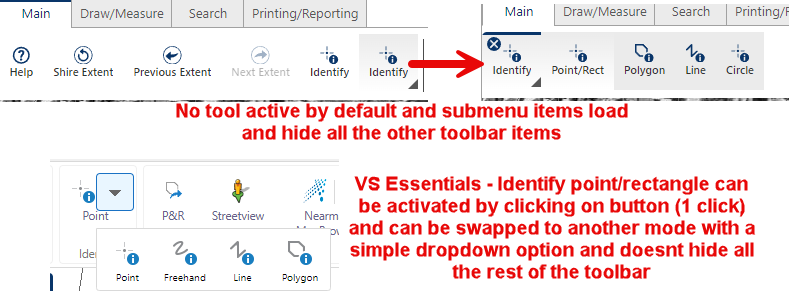
Any tips or ideas people have used?
Thank you!
Belinda
Please sign in to leave a comment.
Comments
0 comments