VertiGIS Studio Web - Measure drawings greatly reduce performance

Hi,
One of my customers noticed that creating measurement areas greatly reduces performance of the app, and even makes the app unuseable.
For smaller areas it doesnt affect the performance, and the threshhold seems to be around 20 vertexes.
Here is an example measure that breaks the performance: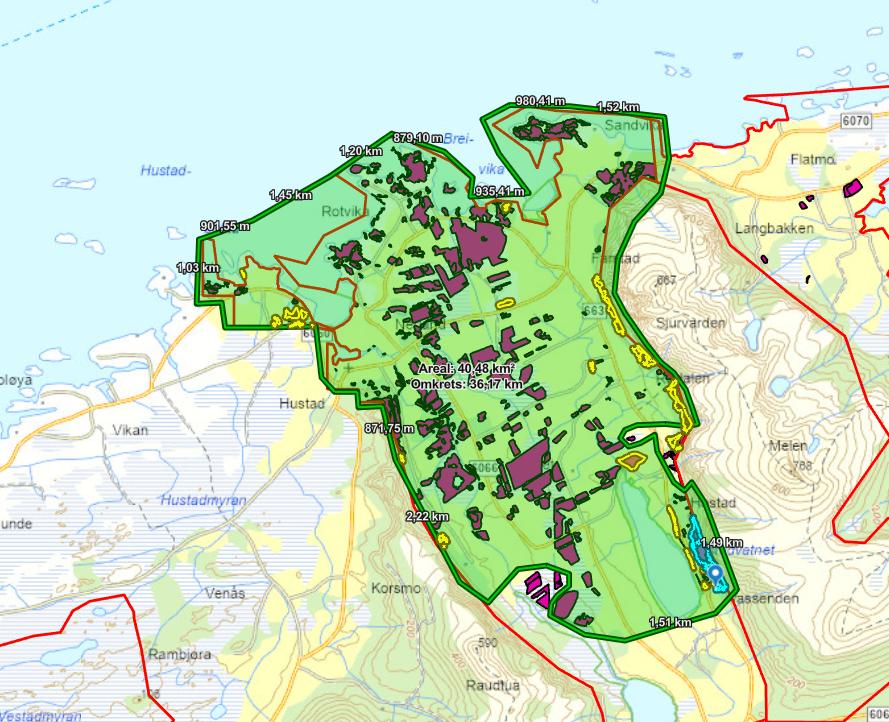
Is there any settings that can help with this, or is it a bug?
Version: VSW 5.29.0
Cheers,
Sindre
-
@... could you take a look at this?
Cheers,
Sindre1 -

Hi Sindre Sellæg thanks for your patience here!
I confirmed that I can reproduce this in VSW 5.30, also that it had been previously recorded as Bug 257660: Area measurement tool slows down the app. I have added you as a stakeholder. I noted in my testing that the threshold for a performance reduction is approximately 20 vertices.
To answer your question, there is not a setting to help with this to my knowledge.
I notified the product team of the issue to raise its priority, though I do not have detail on timeline for resolution.
1 -
Hey Sindre Sellæg I took a deeper look at this after discussion with our QA team, and I noted that I can reproduce on the current version of Edge 126.0.2592.68 but I get the expected performant behaviour on Chrome 126.0.6478.127. This implies there may be an issue here specific to Chromium. Can you confirm A) your browser version and B) whether updating to the latest Chrome improves behaviour here?
0 -
Hey Gareth,
Thanks for checking this out :)
I updated Chrome to 126.0.2592.68, and it might be slightly better with 20 vertices but the app still feels too laggy with around 30 vertices. I tried with both VSW 5.29 and 5.30, and got the same results.
I also noticed that the performance does not improve when clearing the drawings. I have to refresh the app to get the expected performance.0 -

Hi,
I just wanted to second this, and appreciate it's being looked into.
We've tested and experienced the same issue in:
Chrome - 126.0.6478.127
Firefox - 127.0.2
Safari - 17.5 (19618.2.12.11.6)
Edge - 126.0.2592.81
Cheers.0
Please sign in to leave a comment.
Comments
5 comments