Leave results table out for a layer

One of my layers has an attribute table with only IDs, that are meaningless for the users of my app. I want to avoid that the results table of this layer shows if I click in the map. Is there a setting to leave out the results table of a layer? I did not find it yet. Thanks.
-

Hi Stefan,
you should deactivate the identify for the given layer.
Navigate to your map in VertiGIS Studio Web Designer. Under the layer extension settings you can deactivate the different Task Settings options (Identify, Search and Query).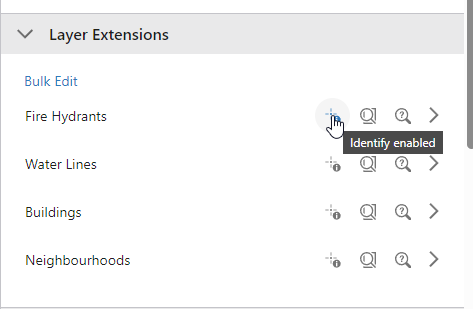
You can also click into the layer and see the options in the layer extension menu: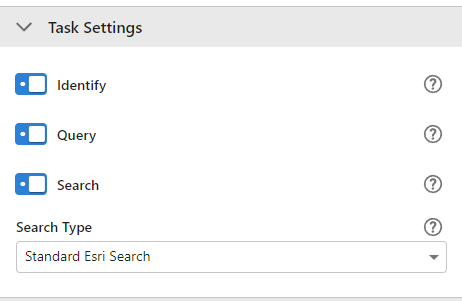 0
0 -
Thanks! I should have known this myself. Still a newbie.
0 -
No problem! This is the right place for questions like this :)
0 -
After several months with other things I started again with VertiGIS.
After deactivating the identify for a layer the results table still does appear (after clicking on a feature in the map), saying ‘No Results’.
What I'm after is a results table not appearing at all if Identify has been deactivated. How? I can't find it.
0 -
Hi Stefan,
I wanted to clarify how the "Identify" feature works for layers. You can enable or disable the identify functionality for each individual layer. This means that whenever the
task.identifyoperation is triggered, only the layers with the identify option activated will be considered.If no layers are marked for identification and a
task.identifyoperation is executed, the system will return a "No Results" message, indicating that the operation was successfully completed but nothing was found.From what I understand, it seems like you're looking to disable the identify operation when a user, for example, clicks on the map. If so, you can definitely remove the operation from the map event and no identify will be trigger at all!
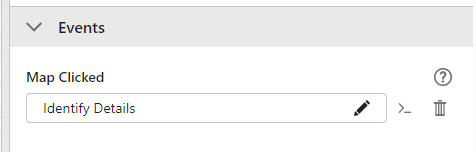
I hope this clears things up and helps you with your projects!
0 -
Thanks Victor. I meant this:
There are some layers in my project that need the Identify option, others that don't.
Imagine in my map the results table is not visible. I switch on only one layer, with Identify deactivated, in my map. If I click on a feature in that layer the results table appears with ‘No results'. What I'm after is the results table not appearing at all in the case of ‘No results’, if the table was not visible before.
I understand that if the results table was visibIe already with results of a previous Identify, the text ‘No results’ appears after clicking in the map with only a non Identify layer active.
It might be too much asked… Hope I'm clear to you!
0 -
I got it!
If you check the Indentify Details Command that you see in the Map Clicked Event you will see two operations: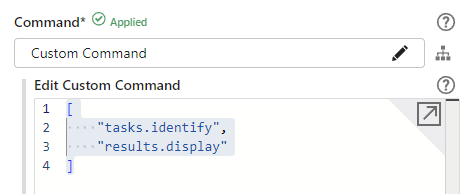
The first is the identification and the second is the display of the results. If the
results.displayoperation is triggered the configured results component will be activated automatically. In that case, If there is no result, the familiar but undesirable ‘No results’ is displayed in the results table. That's the reason you will always get your results component visible.
Of course, you could create a Workflow that performs the identify, and in case there is no results, then do nothing or just show a small notification using ui.display-notification telling the user that no results were found.
0 -
Thanks. I realised before that a workflow would do the trick. That's something for the - time permitting - near future.
0
Please sign in to leave a comment.
Comments
8 comments