Feature Details and Popup formatting

I know I have asked something similar before and been told that VSW doesn't support HTML formatting anymore (https://support.vertigis.com/hc/en-us/community/posts/11497530818962-Customized-Feature-Details-Timeline) BUT is there any control over some of this stuff. For example the image below shows somethings that really bug the …. out of me.
#1 - why is this space blank? Can we not put the title up here?
#2 - why does this font have to be so large?
#3 - why is there so much blank space in here?
#4 - can we line these values up some way?
By comparison - look at the out of the box popup from the Web Viewer. It's clean, clear, concise, and organized. It looks professional.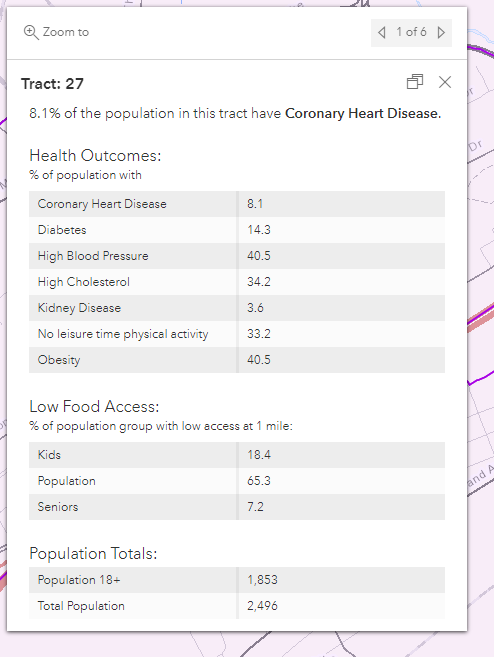
I understand we all have different tastes and I'm not saying my way is the “right” way, but from a data formatting standpoint, I find VSW unbelievably frustrating when compared to GVH.
I would love to see what other folks are doing and how you are customizing the interface and data panels. Maybe I just need a new picture that isn't clouded by all my GVH brain fog.
-

Bryan Lynn
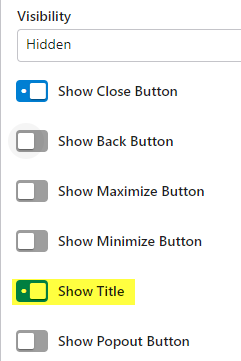
For #1 you can configure the Title to show. This is how I have configured my pop-up.
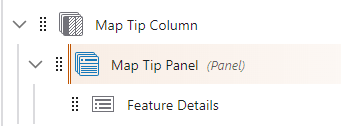
In the Map Tip Panel turn on Show Title
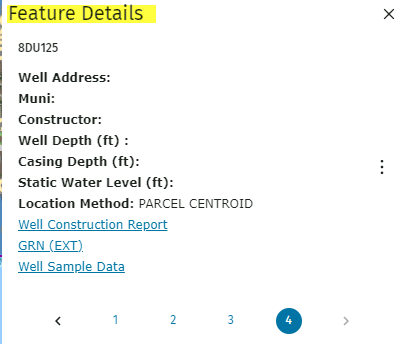
In the Details component enter the verbiage you would like to be displayed at the top. In my case I used Feature Details. It would be nice if this title was reflective of the Layer but haven't figured that out.
 1
1 -

Also for #1, that space is used by the feature switcher when you have overlapping feature popups. As to the other items, the only solution (as far as I know) is to add custom CSS.
0
Please sign in to leave a comment.
Comments
2 comments