Custom Layer Action to Display Metadata

I added a custom command to the layer actions. I want to display some custom metadata text in a popup based on the layer chosen. It currently just has the default “Hello World!” popup that displays when any layer is selected. What workflow or commands would allow for the specific metadata text to be parsed from like a json file into each layer when it's popup is displayed?


-

Hey Brandon, this sounds like something you might accomplish via either Arcade Script in VSW or potentially via Workflow if it is more complex. Can you give an example of the metadata you are looking to get from a layer/feature? I am wondering if this is data within your GIS records, or if based on your mention of a JSON file this is an external data source.
0 -
Hi Gareth,
I would like to parse the description for each layer in the map service. It seems like it could be achieved through some sort of get request. Here is one layer endpoint: https://arcgis.gis.lacounty.gov/arcgis/rest/services/DRP/SMMAR/MapServer/43

Where can Arcade Scripts be added in VSW just out of curiosity?
0 -
Also, is there a way to add some custom javascript within a workflow similar to the inject css? Parsing out the rest service description maybe possible that way.
0 -

I'd use a WF, query the layer REST endpoint, parse it, then format the parsed data as you like into a WF component. Otherwise you might consider writing a custom command. You're gonna struggle to get this with the builtin commands.
0 -

Brandon Price We're not going to allow custom javascript. That would be a security concern.
1 -
Ken Lyon, no problem. Just trying to see if there is a workflow activity that allows for the parsing of the description on an arcgis layer endpoint?
0 -
Brandon Price Nothing for that specifically, no.
0 -
Ken Lyon ok no problem
0 -

If you use the Send Web Request activity with
- URL: https://arcgis.gis.lacounty.gov/arcgis/rest/services/DRP/SMMAR/MapServer/43?f=json
- Channel Name: arcgis
It will fetch the layer metadata and automatically parse it.
You can then use something like an Alert activity with
- Text: =$webRequest1.json.data.description
to access/show the description.
3 -
@... Excellent. That works just fine. Thank you.
 1
1 -

Brandon Price your original post said that this was a layer action. I can see how it works with a static URL, but did you get it to work within the layer menu so that the URL changed depending on the layer selected?
1 -

Hi, following up Helen Dornan's comment if someone found a way to apply dynamic URL for the layer menu depending on the layer? Can we further customise something like that so it also works for when users add a new layer using the ‘Add layer from ESRI portal’ command? Thank you.
0 -
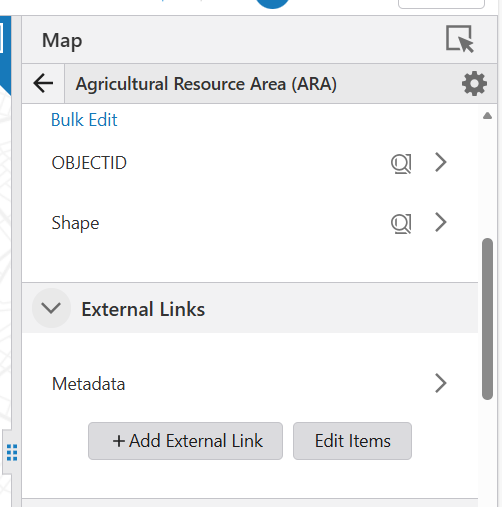
Not me, but now you can add an external URL to a layer at least by finding the layer in the map widget (within the web designer):
 0
0 -

Hello. Has someone found a solution to Helen Dornan's question, about how to get this workflow to work within the layer menu, so the workflow reads description from the url of any layer selected?
Thank you!
0 -
christian kjærup-heide I did manage to get something working. In the workflow I used a Create Value activity to get the value of the layer url from the workflow inputs, the web request then uses url value + “?f=json” as the URL input. Since it's loaded into my layer menu I also added in some logic to make sure that it threw up an alert when a group layer was activated.
1 -
Helen Dornan, that sounds very interesting!
Is there any possiblity that you can say more about how you get the Create Value activity to get the layer url?
I am very new to working with VertiGIS workflows, and it is proving a bit a challenge to figureout how to pick up the url, when running the workflow as a layer action under the layer list.
Thank you!0 -
christian kjærup-heide - of course. First add a get workflow inputs activity, then a create value activity, then a send web request activity.
Others will probably know a better way of doing this, but this is how I do it. Run the workflow in your app with the console log open and the verbose level active (the workflow won't do anything at this stage). Expand the workflow inputs activity and you'll see all the different parameters it captures (these change depending on where the workflow is running from). It'll look something like this (I've cut the list down a lot).
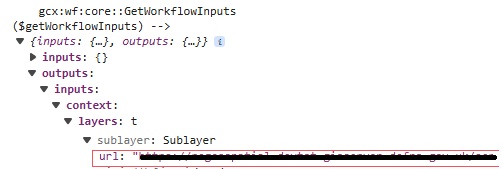
The url parameter is what I'm trying to get to.
The expression for my create value activity therefore needs to be =$getWorkflowInputs.inputs.context.layers.sublayer.url
The send web request url value will then be =$[create value activity name].result + "?f=json" along with the other parameters Ryan Cooney mentioned above.
Hope that's a bit clearer for you
0
Please sign in to leave a comment.
Comments
17 comments