VSW - Sharing Permissions

VSW, upon deploying my app to production, I must update the sharing settings for all associated items. Is it feasible to only modify sharing settings for the production version of the app? This would save some time and simplify. (I believe this is how ESRI has things set up when deploying Experience Builder). Thanks
-

Hi Kevin.
Yes. You can modify only the Production sharing settings. Furthermore, once you have set these once, you won't have to do it again in the future once when re-deploying to Production.
To do this ... access the Sharing Permissions option off the three-dot menu on your Production environment.
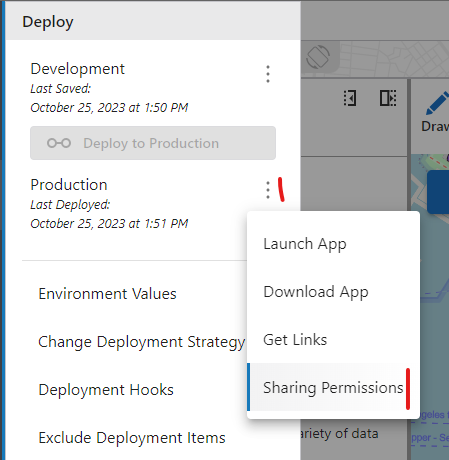
This will show you current sharing permissions for all Production items.
The button at the bottom of that dialog will open your Esri portal with all items selected so you can change the permissions there in a single action. 0
0
Please sign in to leave a comment.
Comments
1 comment