Hide empty result attributes

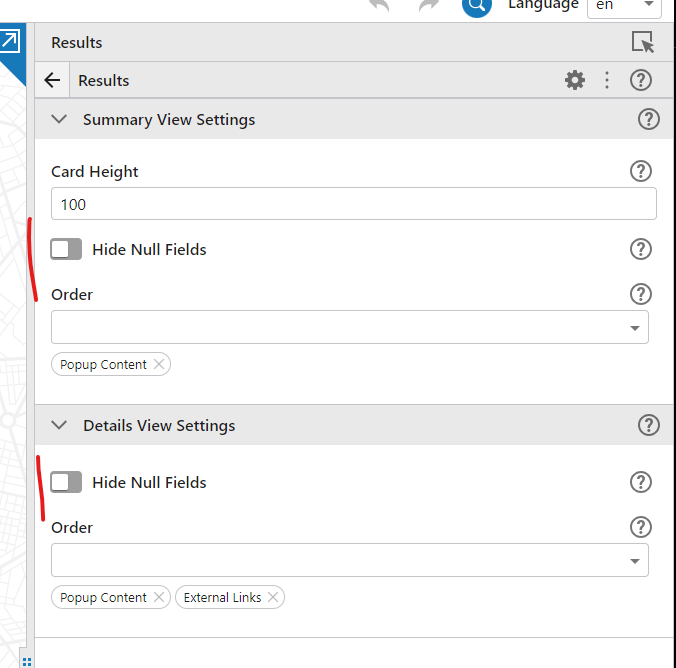
Where is the setting in VS Web to hide empty result attributes?
Thanks,
Frank
-

Hi Frank - it is in the Results service.
 0
0 -

Hi Cam,
Could you please let me know where to find the Results Service? I am using VSW 5.28.
Thanks, Michelle
0 -
Well THAT'S embarrassing ... it looks like when we were going through the Designer code to remove everything unnecessary we accidentally flipped the flag that makes something show up in Designer (or not) for each Service. Looking into it further now.
 0
0 -
As a short-term work around if you need it. This is what the Results Service looks like in the app.json where I've configured everything you can configure so it shows up for you to see what is what.
 {
            "id": "results",
            "detailsViewSettings": {
                "popupOrder": [
                    "hyperlinks",
                    "popup-content"
                ],
                "hideNullFields": true
            },
            "summaryViewSettings": {
                "popupOrder": [
                    "popup-content",
                    "hyperlinks"
                ],
                "hideNullFields": true
            },
            "summaryCardHeight": 120,
            "$type": "results-service"
        }
1 -
Hi Cam,
Thank you for your quick response. I tried editing the app.json and could see how it worked.
Best Regards, Michelle
0
Please sign in to leave a comment.
Comments
5 comments