Determining current layer theme

I am trying to create a workflow that will toggle certain layers on and off within a certain layer theme. My layer themes are based off map services that stem from one map service on the server. Each layer group that these layer themes stem from have some of the same layers, but just with different symbology. I have tried a toggle to just turn one layer off and another on, but in the map it will switch to a whole different map theme. So does anyone know if its possible to determine what layer theme is being shown?
-
Not sure if I'm being obvious, but you can set the layer theme by using the external command within Workflow: "SwitchToLayerTheme" and supplying the Theme ID as the command parameter.
You might structure your workflow to switch to a particular theme and turn layers on/off with the "Set Layer Visibility" activity.
0 -
I know there is a way to set the layer theme, what I want to know is if there is way to get the current displayed layer theme.
For example,
If I had a workflow that has a parcel query tool in it or a add feature tool, and if a user clicked it when they werent in the appropriate layer theme, it would give them a message saying that your in the wrong layer theme to use this tool.
0 -
Chris,
+1 from me.
Did you ever figure out if this is possible?? This would be a very useful command. I am facing the same problem and would like to check that the user has the correct layer theme on prior to starting a particular workflow.
thanks Ben
0 -
Ben,
Still did not figure out this problem. What is available now is get layer visibility, and it could be used as the same if you could do it that way.
0 -
Anyone has figure out this problem? We have multiple themes and checking visibility of all layers if not practical. 0 -
Just found answer to my question. LayerTheme events are documented . 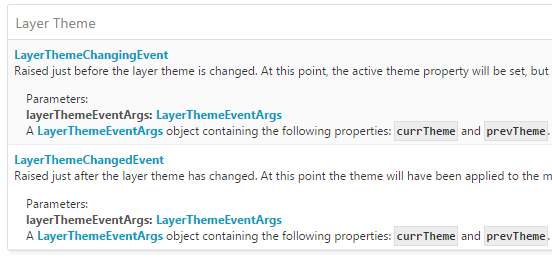 0
0 -
I don't want to wait for an event, but just want to get the current layer theme. How to do this? 0 -
I don't think there is no direct way from the OOTB currently other than above suggestion, and without little custom code.
You may implement the client command to get it from your implementation,and excute your command from your workflow.
Your command implementation will be few lines to get by app.site.essentialsMap.layerThemesInfo.activeTheme.displayName (or id) where app is geocortex.essentialsHtmlViewer.ViewerApplication0 -
Thanks. The same thing for Silverlight? 0 -
Nope. my posting above is about GVH only. The client custom command implentation should be done each viewer for GVS and GVH differently but similary with the same command name.
The custom commands can be accessed through .zap file for GVS, while with .js (custom library) for GVH.
For GVS, I think you can get the current active layer theme from Site.EssentialsMap.LayerThemesInfo.Active.ID or Site.EssentialsMap.LayerThemesInfo.Active.DisplayName0
Please sign in to leave a comment.
Comments
10 comments