Accessing map services via SSL

Hello everyone and apologies for bringing this up again, but I just wanted to check if anyone has been able to get Geocortex to work with a self-signed SSL certificate in the latest version?
My setup:
- I've got AGS 10.2 running on one machine, and have enabled SSL using a self-signed certificate.
- The web adaptor is running on another machine and has the HTTPS AGS instance registered with it.
- The web server runs IIS and has a *.domain certificate registered with its HTTPS binding.
I can access map services from my local browser through both the web server, and the AGS machine, using SSL - I do get a certificate error though.
When I open a site in Geocortex REST Manager, I can't connect to any of my map services, the error message being: Underlying error: The underlying connection was closed: Could not establish trust relationship for the SSL/TLS secure channel. I've seen other posts that talk about this (e.g. (https://support.geocortex.com/SupportForums/Thread.aspx?pageid=0&mid=2&ItemID=2&thread=45821) this one ) and it seems Geocortex simply won't work with self-signed SSL certificates. Is there a workaround at version 3.15/SL viwer 1.10, or am I wasting my time? Any pointers would be much appreciated as I'm feeling a bit funny about building new Production servers without being able to fully test everything on TEST.
Cheers,
Jan
-
Hi Jan,
As Jonathan mentions in the thread you linked to, if your browser does not trust the certificate (ie you have to click through the certificate error to get to see the services), then you will not be able to add the service in Rest Manager.
There are a number of resources that provide suggestions on how to get your browser to trust the certificate. Please try the steps suggested in the following articles to get your browser to trust the certificate:
http://www.conetrix.com/Blog/post/How-to-Trust-a-Self-Signed-Certificate-in-IE-9.aspx
-Victoria
0 -
Hi Victoria,
Thanks for the link you provided! I tried a few similar things already but had no luck - I'll give this a go as well and see if it helps. It would be brilliant to get it working in our test environment as this would give me much more confidence for setting up production.
Cheers,
Jan
0 -

Though I'd tag on to this thread regarding access to map services via https.
GE 4.3.1, GVH 2.4.1, MS Windows Server 2008 R2 Standard
We're trying to access the US FEMA floodzone map service using https vs http. We can access the map service, https://hazards.fema.gov/gis/nfhl/rest/services/public/NFHL/MapServer, through a browser, but when we try to connect through Essentials Manager the connection fails. FEMA does have a note on their website which states: " Due to a recent change in security settings, some clients are experiencing difficulties using https links. We recommend using http links when referencing the NFHL GIS services, ie. http://hazards.fema.gov/gis/nfhl/rest/services." I did contact them, and they suggested making sure the security protocols include tls 1.0, tls 1.1 and tls 1.2 which our browser do, but I'm not sure how to address EM security protocols.
Does anyone have an idea why the connection would fail in EM? Is there a server security configuration required for tls 1.1 and 1.2?
Thanks for your help.
Frank
0 -
I am having the exact same problem as Frank with the FEMA floodzone map layer. Has anyone been able to access: https://hazards.fema.gov/gis/nfhl/rest/services/public/NFHL/MapServer through Geocortex Essentials? 0 -

Hi,
I've seen this issue with the FEMA SSL certificate in Windows Server 2008 and 2012. It appears to be a .NET issue tied to a Windows Update rather than a issue with Essentials.
If you check your Windows Event Viewer System logs you will notice that anytime you attempt to connect to the FEMA mapservice via Essentialst there is a SCHANNEL error.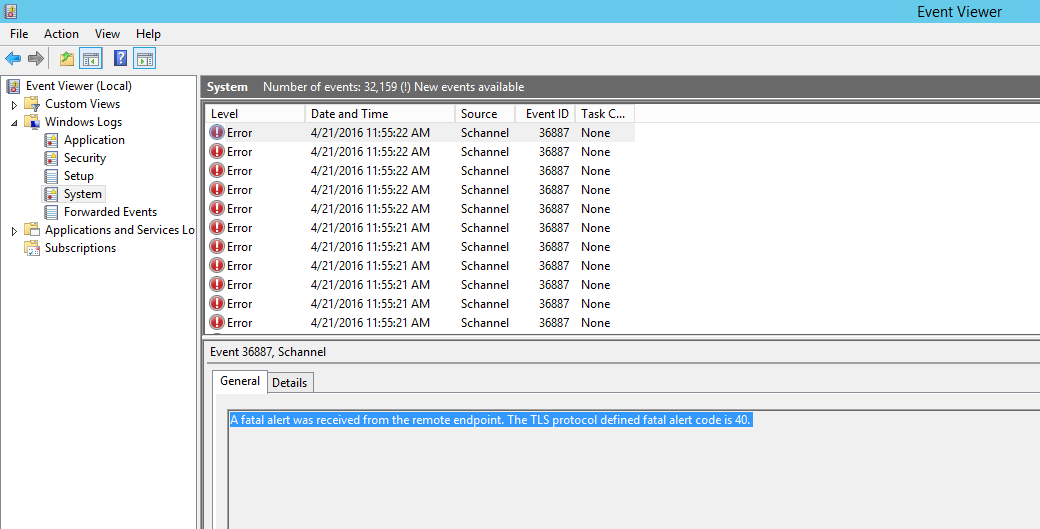
The only fix I've seen is to run Windows Update or upgrade to .NET Framework 4.6.
https://support.microsoft.com/en-us/kb/3069494
Thanks0 -
Hi Mike,
I have gone through installing .NET Framework 4.6 and run windows update but unfortunately, it has not addressed the issue with connecting to the FEMA NFHL service. I have been able to connect to the web service no problem using other the ArcGIS Online map viewer and a light mapping client using the ESRI Javascript API hosted on my local machine. When trying to add the service in Geocortex, i still get the Schannel errors you describe.
Do you have any other suggestions into resolving this issue?
Thanks0 -

I am having the same issue trying to connect to my https arcgis 10.31 server!
Any updates?0 -
we having the same issue trying to connect to our https arcgis 10.5 server!
Any updates?0 -
Hi,
To expand on what I wrote last year, the actual issue is TLS 1.2 and .NET 4.0. Essentials is built on the 4.0 framework which doesn't inheriently have a mechanism to connect via TLS 1.2. The work around is to make use of the SchUseStrongCrypto registry setting to require all .NET applications to use TLS 1.2 instead of 1.0 by default. See the Knowledge Base article below.
https://support.geocortex.com/essentialsGSCkba?id=kA360000000L14b
Thanks,
Mike Ketler0
Please sign in to leave a comment.
Comments
9 comments