Showing Driving Directions for Route Task Activity

Hello all,
Is there a way to display driving directions for shortest route solved by a “Workflow-Route Task Activity”?
Any help is appreciated.
Hani
Screenshots Examples:
1- Get Directions in ArcMap.
/customer/servlet/servlet.FileDownload?file=00P6000000em1fKEAQ
2- Get Directions in application developed using ArcGIS Viewer for flex.
/customer/servlet/servlet.FileDownload?file=00P6000000eltxeEAA
3- Geocortex
/customer/servlet/servlet.FileDownload?file=00P6000000eltjhEAA
0
-
Any word on this functionality coming to Geocortex - users love it in our AGS online application and it's much more user friendle the the current Geocortex Route task
0 -
has anyone figured this out? doesnt look like the namespace exists in workflow yet.. 0 -
Hi Chris (and others),
It actually is possible to get driving directions back from a RouteTask in a workflow. While constructing your RouteParameters variable for the RouteTask, you will need to assign the property that decides whether to output directions:
ie: Assign activity: routeParameters.ReturnDirections = true
The resulting RouteSolution from the RouteTask will contain directions in:
routeSolution.RouteResults(0).Directions
The type for this property is an Esri.ArcGIS.Client.Tasks.DirectionsFeatureSet. This object cannot be serialized; you will get errors if you try to set client side activities like DisplayForms or Alerts to show anything from routeSolution or routeSolution.RouteResults(0).Directions. So you will probably want to parse through it and push the information that you need from into a variable or variables that are ok to go to the client side. Then you would keep routeSolution scoped to a sequence with no client-side activities, or use an Assign activity to set routeSolution = Nothing in order to avoid serialization errors.
As a quick example, here's what I tested with: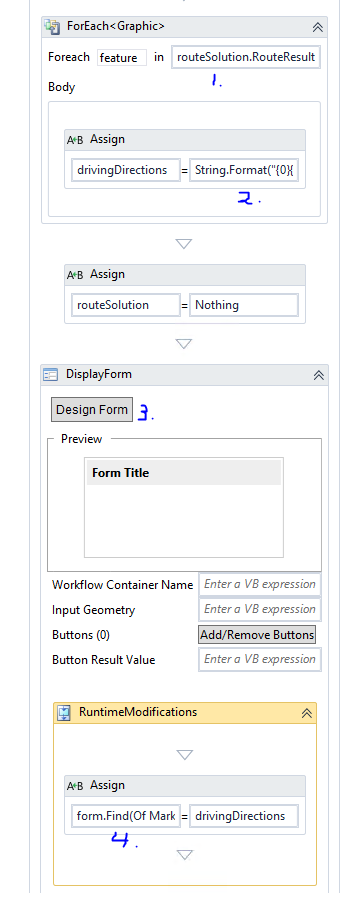
Annotations for the parts you can't see from the screenshot are:- routeSolution.RouteResults(0).Directions.Features
- String.Format("{0}{1}{2}", drivingDirections,feature.Attributes("text"),Environment.NewLine)
- I added a single Markdown form item to the form here
- form.Find(Of MarkdownFormItem)("Markdown1").PlainText
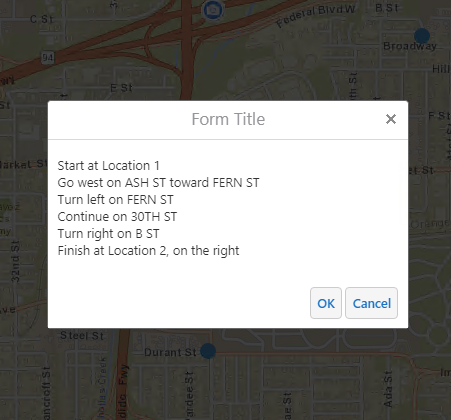
Of course, this all assumes that you've been able to set up a RouteTask activity. If anyone's new to that, I would recommend checking out this KBA (https://support.geocortex.com/essentialsGSCCodeGallery?sub-nav=codegall&main-nav=essentials&#!/feedtype=SINGLE_ARTICLE_DETAIL&criteria=BESTANSWERS&id=kA4600000004EXrCAM) . The RouteTask Url and ProjectTask Geometry Service Url are out of service now and would need to be updated, but the rest of the set up should be ok.
Finally, I would definitely recommend voting on some of the existing ideas on this topic or posting your own if you'd like to see a simpler way to do this or an out-of-the-box tool
https://support.geocortex.com/essentialsGSCIdeasDetail?c=09a6000000008RsAAI&id=087600000008eVoAAI&categ=?-nav=ideas&main-nav=essentials
https://support.geocortex.com/essentialsGSCIdeasDetail?c=09a6000000008RsAAI&id=087600000004MhjAAE&categ=?-nav=ideas&main-nav=essentials
Hope that helps!
-Amanda0 -
Hi Amanda, we have successfully set up driving directions to be displayed in our map. We were wondering, is there a simple way to export the directions to a report or map for printing?
Thanks!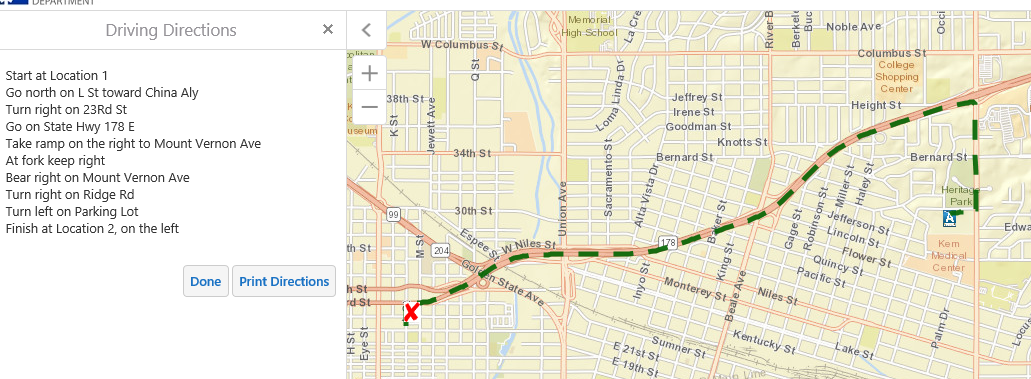 0
0 -

Hi Lisa,
To have the directions exported to a report, you can use the Template Report activity. It takes in a URI for a report template and a DataSet to populate the template. You can then use a CreateTempFile activity to put the report into a PDF file. You can find examples of workflows that generate reports in the Code Gallery, check out Using the Template Report activity and Generate a multi-layer report (LA County site). In the latter, you can find the report-related activities in "Create Report Sequence".
If you still get stuck feel free to open a support case by emailing support@latitudegeo.com and a support analyst will be happy to help you.
Thanks,
Aaron Oxley0 -
Anyone know if I can get the screenshots from this post? They don't appear to be available anymore.
Thanks0
Please sign in to leave a comment.
Comments
6 comments