Cached imagery not showing up in print template

Hello:
We are having an issue where imagery cached in accordance with the tiling scheme of Bing/ArcGISOnline/MapQuest, etc. is not showing up when sending to print. Image services (not cached) or imagery cached out at other, custom levels show up when printing just fine, just not those that are specifically set at those industry tile levels, and the MapQuest resources won't show at all in print functions. We have a dpi set up at least 96 for our print templates as well. Not sure if anyone else has come across this issue. Thanks so much for any help.
-
Hi,
We are experiencing the same issue. This is proving to be a real challenge. Does anyone know what cache tile scheme we need to use in order to get it to "play nice" with ESRI base maps? Thanks so much.
0 -
For what its worth. I had the same issue with the cached map service not showing up while printing. That map service had a tile format of mixed. I switched to a cache service using the exact same data with a tile format of JPEG and it prints perfectly now. I don't know if that was the issue or not.
0 -
Has anyone figured this out? We're consuming all of our imagery via a variety of cashed WMS services and if users can't print with the background imagery, they'll be a little unhappy to say the least.
0 -
Hello Scott,
What version of ArcGIS Server are you running? I ask, as we just received a report today from a customer that there is an issue with tiled basemaps failing to print in ArcGIS Server 10.3.
-----------------------
[BUG-000085004: Map export fails when requesting an export from a cached map service created using ArcGIS 10.3 for Server. ] Apparently, this issue is resolved in version 10.3.1 of ArcGIS for Server, which is available for download. The only other solution is to use an "EXPLODED" format cache, rather than the compact cache format in 10.3 ArcGIS Server.-----------------------
Could this be what is happening for you? If you'd like for the support team to investigate this further, please send in a request to support@geocortex.com.
Best wishes,
Pandora
0 -
HI Pandora,
The WMS we are having problems with is provided by a vendor and is running on a proprietary service called DataDoors rather than ArcGIS Server.
0 -

Pandora,
I have a similar issue with a tiled basemap cache. I have six basemaps--all custom (i.e. none are ESRI). Some are vector data (with shaded relief) while others are mostly aerial imagery. All of the basemaps print just fine except for the basemap that is set as the default basemap upon load. We are using ArcGIS Server 10.3 and haven't upgraded to 10.3.1 as of yet.
I wiped out that particular base map cache and re-created it from scratch using an exploded versus compact cache. That appears to have solved my problem--at least in the short term.
I just thought I would add to the potential knowledge base for potential solutions...
Brian
0 -
Just chiming in here - having the same problem
ArcServer 10.3
GE 4.3
HTML5 Viewer 2.4
'Mixed ' Tile format
typical ESRI scales (564, 1128, 2256, 4513 etc.)
0 -
+ 1. Same issue. Running AGS10.3, GE 4.3 and HTML 2.4. We have a handful of cached basemaps in mixed tile format. Our HTML5 apps seem to print OK with the default basemap that is turned on when the map launches. If the user switches to a different basemap print jobs will not render the changed basemap at all.
0 -
Hello,
I am also having a similar problem as others, however we are still using ArcServer 10.2.2 with HTML5. Whichever Cached layers we have checked on by default in Essentials Manager work in the print template, but when we try and change the cached layer in the viewer and turn on something that is unchecked (such as a different air photo year), the print template shows up completely blank. I tried to change "Compact" to "Exploded" and also changed "Mixed" to "JPEG" in two separate tests, and neither changed the result.
Thanks,
Greg
0 -
I just noticed that this may have been fixed in the GVH 2.4.1 release which, in the release notes, shows a bug fix: GVH-5922 Non-default basemap fails to print.
I'm going to test this to see if the problem is resolved.
-Erick
0 -
GVH 2.4.1 appears to have resolved this basemap printing problem. Now, a user can change basemaps and printing seems to be OK.
0 -
We are still seeing the problem where the HTML5 viewer (2.5.2) won't display the cached imagery in a print template or in an image export if the cache uses the newer compact cache format ESRI introduced at 10.3. It doesn't matter in our testing if the cached service layer was on/off by default. Exploding the cache fixes it every time.
I wonder when Geocortex will support printing/exporting the newest compact cache format?
p.s. I'm hoping someone makes me feel like an idiot and sends me an easy fix for this (fingers-crossed)0 -
same issue:
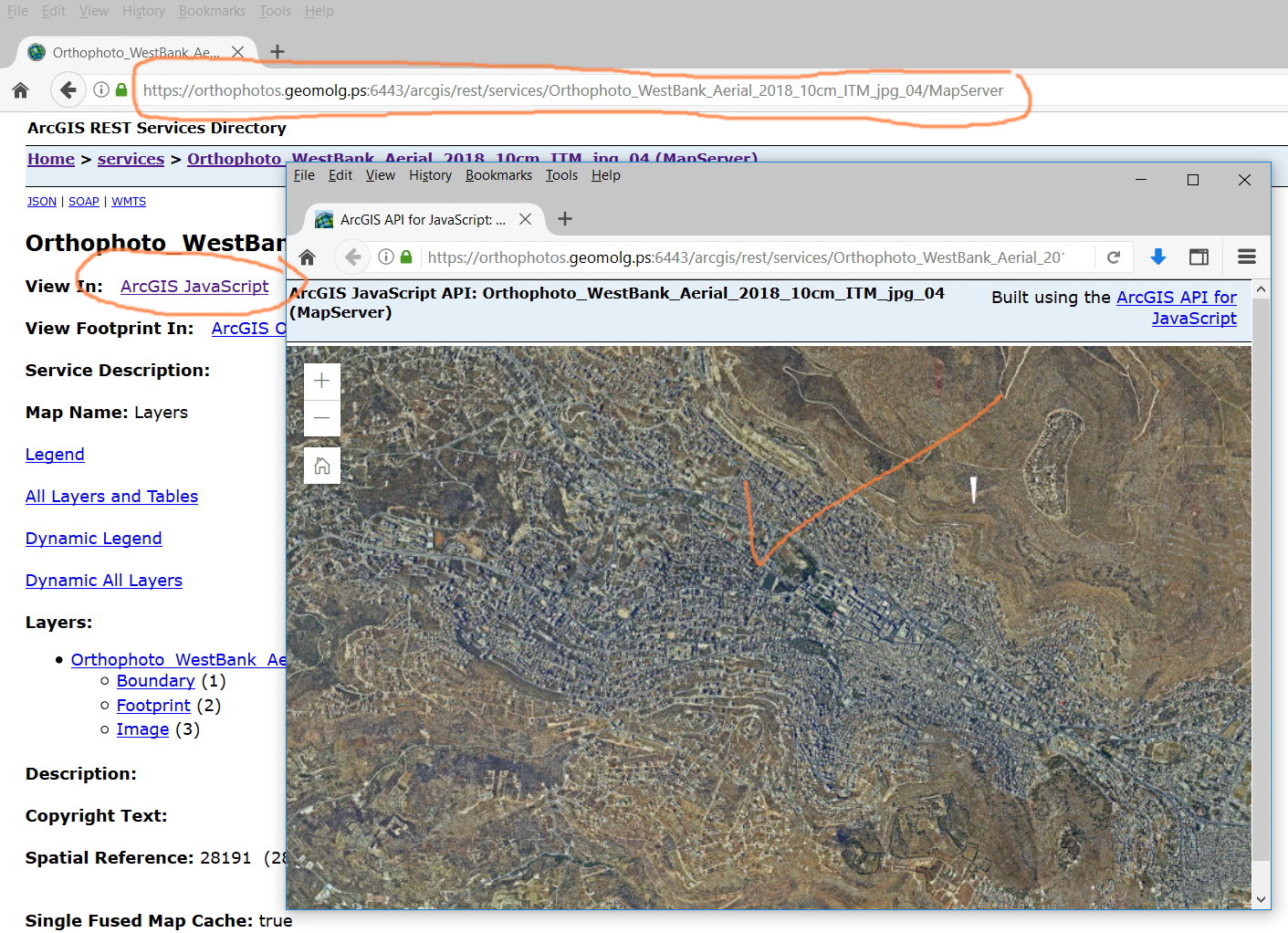
I couldn’t figure out why Geocortex print tool fails to display the orthophotos below in the output of the print
https://orthophotos.geomolg.ps:6443/arcgis/rest/services/Orthophoto_WestBank_Aerial_2018_10cm_ITM_jpg_04/MapServer
what could be the issue here?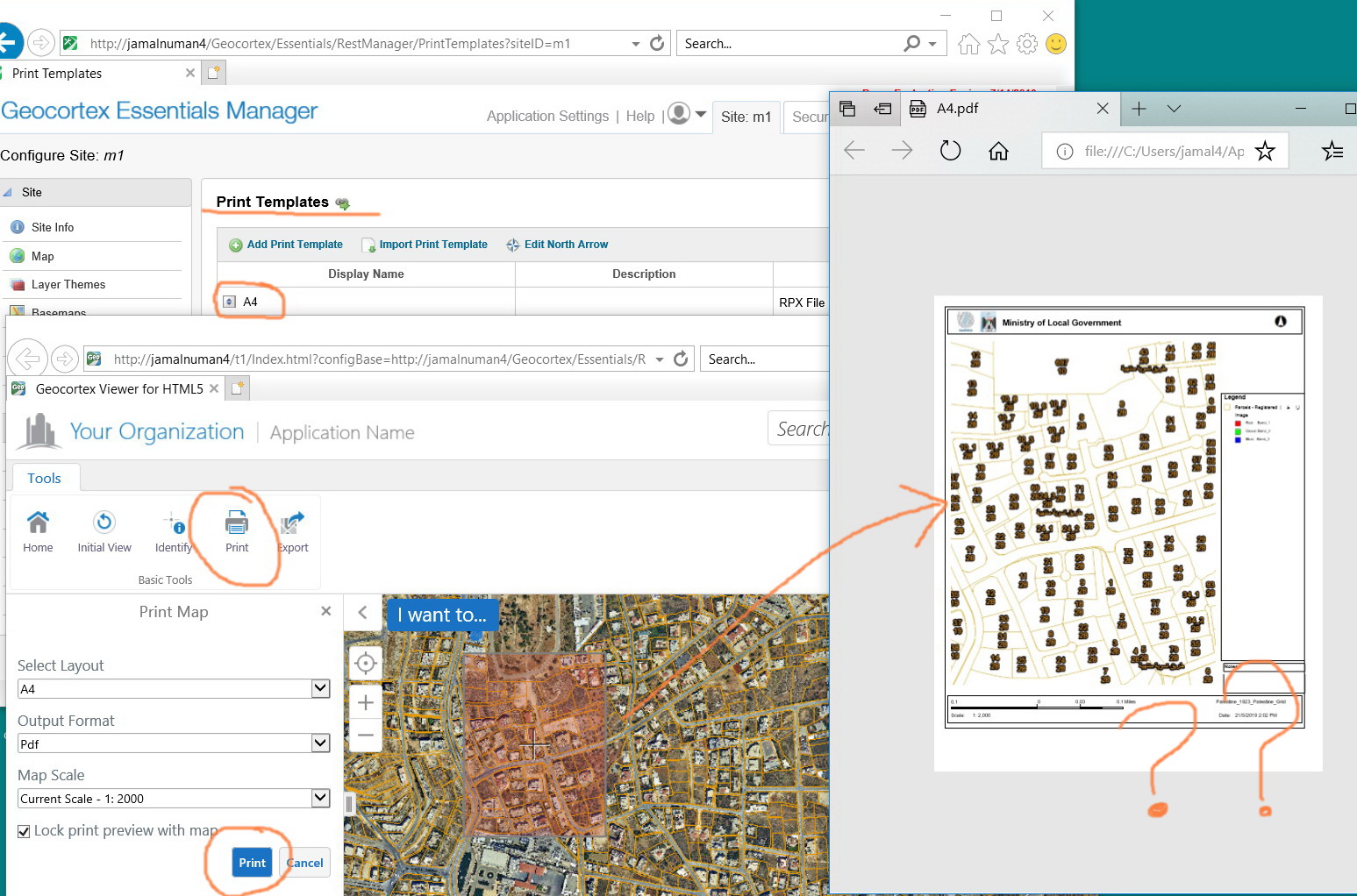
 0
0 -

Jamal,
I had the same problem when building a new server at 10.6.1 with my caches not displaying in the .pdf.
For me, I had to access the service directly (I used Catalog), chose service properties, and unchecked the box below regarding dynamic layers.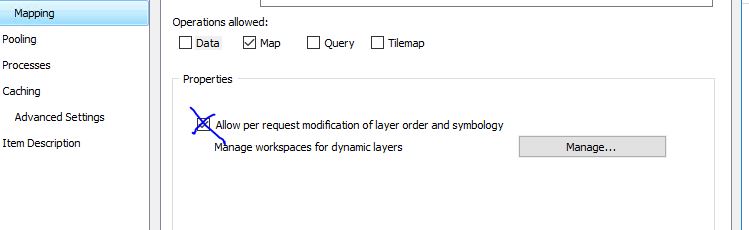
If I tried to republish and overwrite the existing map service (keeping cache) and unchecked the box during the process of overwriting, it never seemed to work. The services kept being published with dynamic layer options.
I had to uncheck the option after the service was created from a service connection in ArcCatalog.
Once I did that with all the cached services I had, they finally appeared in the .pdf created within GCE
Carmen0 -
UNCHECK the box. I realize the image wasn't clear as it was in my head when I snagged it. 0
Please sign in to leave a comment.
Comments
15 comments