After upgrade- Parcel Report - opaque highlighted parcel

Hello all,
I just upgraded to the latest GE and HTML Viewer. Still at SLV 2.4. Report does this in either viewer.
In my parcel report, the "highlighted parcel" is now opaque which hides everything below the highlight graphic. Anyone know how to change this and/or is anyone else seeing the same thing? If so, I will submit to support. But if there is an easy fix, I would like to know.
BEFORE UPGRADE:
/customer/servlet/servlet.FileDownload?file=00P6000000elTOjEAM
AFTER UPGRADE:
/customer/servlet/servlet.FileDownload?file=00P6000000elTOoEAM
Thanks,
Carmen
0
-
Turns out to be an easy fix. There is now a setting available on the "Feature Map" settings (see below) that was not present before. I just changed the opacity.
This doesn't really answer the question as to WHY it was transparent before the upgrade (since that option wasn't available) except that perhaps it was using a setting in our custom theme.
Feature available in GE 4.4 that was not available in our older version of 4.2...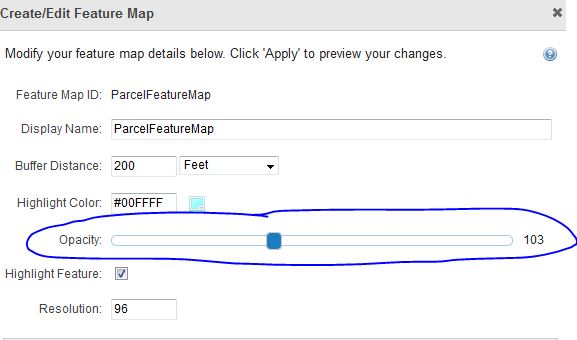 0
0
Please sign in to leave a comment.
Comments
1 comment