Bing Maps Service Connection

I have a Bing Maps Key (Serveral Active Keys in fact), one created today, and when I attempt to create a Bing Maps Service Connection for my Site and use said key it comes back with "Invalid Key". I have even attempted to use a previously known key. I have added the 3rd Party Map Integration using a Bing Map Key that when used to make the Service Connection returns the "Invalid Key" error. Any Suggestions?
0
-
Hi Dane,
I have the same error. Do you find solution for this one?
Regards
Long0 -

Hello,
I am not able to replicate this issue. Two things to ensure that you add them properly: 1) add a valid key into BingMaps.html 2) configure bingmaps in the "Integration" module ->"externalComponents". eg. "externalComponents": [
{
"id": "bingMaps",
"displayName": "Bing Maps",
"uri": "Resources/3rdPartyMaps/BingMaps.html",
"viewpointIndicatorUri": "Resources/Images/Icons/location-direction-red-32.png"
}
Hope it helps.
Cheers
Long0 -
Hi Longguan,
The Bing map is used as the base map layer, not the 3rd party map.
The Bing map key just created from Bing Map Dev Centre.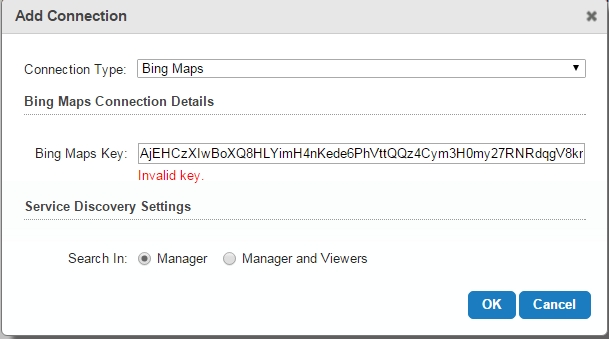 0
0 -
Hi Long,
Sorry for my misunderstanding. I add our bing map key. it works. I am able to add the bing map as a base map layer.
Long0 -
Hi Longguan,
Do you know any reason could cause this problem?0 -
Hello Long Cui,
A possible reason could be that the key is an invalid key or expired key, and you can also check the key you entered in the text box that there are no spaces or extra characters at the start and end of the string.
Cheers
Long0 -
Hi Long
The key is just created from Bing Map Dev Centre.
I have checked the key and there is no errors.
Is there any way I can directly modify in the configuration file?
Thanks
Long Cui0 -
Hello Long,
I google it, and find this link https://geonet.esri.com/message/83287#83287, this could be another reason I guess?
Thanks
Long0 -
Another link https://geonet.esri.com/thread/87005 0 -
Hi Long,
Hi Long,
Unfortunately this solution can't fix the problem.
In service connections, there is a Bing Map connection with expired key. As the new key is always recogonized as invalid key. I can't update it. Is there any way I can direclty edit in file. If there is possible the bing map file become read only?
Thanks0 -

Hello Long,
Service connection information is kept in the RestAppSettings.xml file within the Sites directory.
I'll file an issue with your name as a stakeholder regarding the expired key issue.Thanks, Stefan
0 -
Hello Long,
I am unable to reproduce this issue. Which version of GE are you using and have you been able to fix this? Any more information would be appreciated.
Thanks, Stefan
0 -
Hi Stefan,
Thanks very much for the help. We figured out the problem. It turns out the fire wall issue.
Regards
Long0 -

Hi all,
I have a key, but when i add service connection return mesage "invalid key".
I want GE 4.5.2 version.
I add bing maps key into my ArcGIS Online account and it works.
Can i help me?
Thanks.0
Please sign in to leave a comment.
Comments
14 comments