how to loop through a DataTable in Workflow Designer

I am working on a workflow that would allow a user to upload a excel sheet (in a predetermined format), then get inserted into sql server using the SQL non-query activity.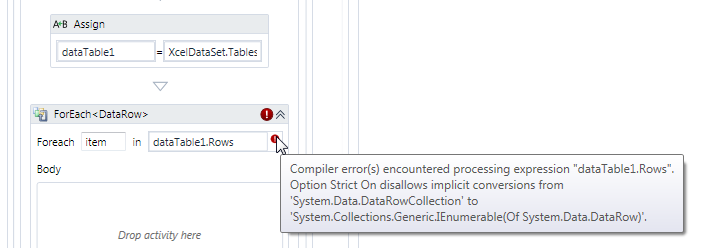
Ive got my data into a DataTable and I would like to use the ForEach <T> activity to iterate through the rows and perform the SQL non-query activity for each row. However I am not too familiar with the data types and I am having issues with the ForEach Activity. Can anyone shed some light on how I go about converting the data into the proper type to loop through?
Thanks,
Chris
0
-

Hi Chris,
The .Rows member of a DataTable is a DataRowCollection, which doesn't advertise itself as an Enumerable object.
You can use a Linq expression to transform it into an enumerable object, though:dataTable1.Rows.OfType(Of DataRow)Regards,
-Malcolm0 -
Perfect! Thanks Malcolm. 0
Please sign in to leave a comment.
Comments
2 comments