Consuming ArcGIS Online services in the Geocortex,

_img_ alt="User-added image" src="https://latitudegeo--c.na53.content.force.com/servlet/rtaImage?eid=906600000000BGa&feoid=Body&refid=0EM60000000DEAg" _/_img_
_img_ alt="User-added image" src="https://latitudegeo--c.na53.content.force.com/servlet/rtaImage?eid=906600000000BGa&feoid=Body&refid=0EM60000000DEAq" _/_img_
best ,
majdoleen
-

Hello Majdoleen,
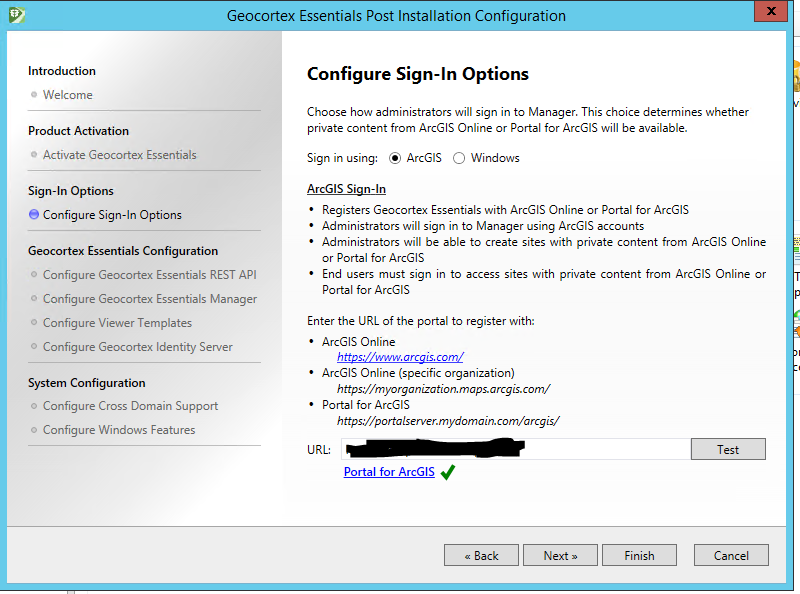
If you run the Post Installation Configuration program and configure the Sign-In Provider to use the URL to your organizaiton, when you perform searches to find map service, Essentials will search within theArcGIS Online content hosted by your organization.
Thanks, Stefan
0 -

Is there a way to consume AGO hosted services without using AGO as the sign-in provider? Our organization doesn't use AGO, but we have a partner organization that does and we need to see their services in our Geocortex viewers. 0 -
I also need to know this. It seems like a strange oversight that the only way to consume ArcGIS Online features is to change the entire authentication model for Geocortex. You should be able to add a service in and provide credentials in the site manager - just like a secured WMS for example. Becuase most organisations require AD authentication and federating that to Arc Online may be impossible or highly unlikey. 0 -
Hello there,
Could Latitude provide some clarification on this issue...
Can we authenticate with AD and also access private ArcGIS online content, like adding said content to sites that are secured using AD?
Thank you,
-Ben
-Ben0 -
Hi there,
It is possible to add a service connection to ArcGIS Online to be able to interact with publically-available map content, but not organizational. To my knowledge, you can only access private ArcGIS Online content when you have registered using your organizational URL within the Post Installer. For interacting with private content, I would suggest creating a secured Portal for ArcGIS instance within your local network, if possible.
You may be able to create a custom security provider which would require manually editing configuration which Latitude Support would be able to assist you with.
I hope this infromation is helpful.Thanks, Stefan
0 -
Here is how I got it working: - We Integrate Geocortex's Identity Store with ArcGIS for Portal which leverages authentication from Active Directory
- I logged into ArcGIS Online with an "Enterpise Account". In other words you have to setup an Organizational AGOL account which is hopefully part of your ESRI license agreement
- I then requested access to the AGOL Service from the data providor with my Enterprise AGOL account
- Once granted I tested in AGOL with no issues
- I then added it as an item to ArcGIS For Portal and logged in to that service using my Orgnaizational AGOL account.
- I then tested again in Portal by "Open in Map".
- At that point it asked me for Authentication and I actually had to put in my ArcGIS For Portal Active Directory Account and not my AGOL Organizational Account
- This made it work in Portal Web Maps
- I then "Shared" it in ArcGIS for Portal so I could pull it into Geocortex
- Pulled it into Geocortex without issue.
 0
0
Please sign in to leave a comment.
Comments
6 comments