Concatenating two fields in the display fields(Query details_ of the Form's Combo box

Hello,
I have two fields "FIRST_NAME" & "LAST_NAME", and we are looking to concatenate these two fields and display it to the user.
For this task, we are using the design form combo box.
Please let us know as how we can conactenate two fields in the "Display field" value of the form's combo box.
I tried FIRST_NAME + LAST_NAME, but it didn't worked.
Thanks
Srikanth
0
-

Since it's VB.net the concat operator is "&". That's what worked for me. 0 -
Hi Eugene,
I did used "&" opertaor for concatenation but it didn't worked for me.
This is what I did mentioned in my query details of combo box :
TaskURL : http://svmoap14:6080/arcgis/rest/services/ZoomToName/MapServer/4
Where Clause : 1=1
Display Field : FIRST_NAME & LAST_NAME
Value Field : FIRST_NAME
Please let me know If I am missing any information?
Thanks
Srikanth0 -
Did you try FIRST_NAME,LAST_NAME or FIRST_NAME LAST_NAME? Maybe under the hood it's expecting a comma seperated or space seperated list which it concantenates. I'm guessing the task extracts the field values for you since it is asking for Display FIELD and Value FIELD. 0 -
Hi Eugene,
Neither of them didn't workm but Thanks a lot for looking into it.
-Srikanth0 -
Maybe try "CONCAT", for example:
FIRST_NAME CONCAT LAST_NAME
We had a custom module developed for us that uses this syntax. I'm not sure if it's specific to that module, or if it can be more widely applied within Geocortex, as in your situation.0 -
Thanks Lindsay for looking in to my question and providing your inputs on it. That didn't worked. 0 -
Thanks a lot Marshall, your workflow did fixed my issue. 0 -
Thanks for this post. It helped me figure out how to get a list of search results into a combo box list. Plus it reminded me that string.format is a valid construct to use in workflows. I'll add that to bind the combo box to the data list, input the data item list into the "Input Data" box on the form page. 0 -
I tried this method before when I wanted a "road name" and the relevant "road type", however my results end up with a list of 20 of the same road name (e.g princes highway 20 times in the dropdown).
Currently I am using an autocomplete box for the road name and an autocomplete box for the road type, which I then concatenate in the attribute table. I would prefer to have it so the user types in "princes..." and only get the relevant options for that road - e.g "princes highway" "princes road". I have not thought of a solution to this yet.0 -
Though I should add another method I tried was having a listbox for the road type in the combo box, based on the road name in the autocomplete box. But I didn't like this method either as it resulted in a large visible list of road types for a road in my form. 0 -
In the example I provided, if you set the original query argument 'Return Distinct Values' to true, that should only return what you are looking for. 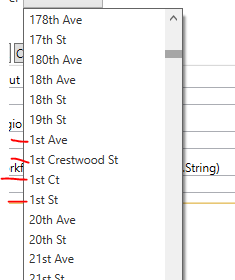
And each one of those has serveral segments. If I turned off the return distinct, each one of those 1sts would have 3-10 of the same one, each, in the combobox.0
Please sign in to leave a comment.
Comments
11 comments