AD Group Security

I have 2 AD groups we'll call them group A and group B
Group A has a select number of users. Group B has all of the users including the ones in Group A.
I have a layer in an application that I only want group A users to access but I want all of Group B to access the application. How do I set up the permissions to accomplish this?
Right now the permissions for Group B are set to allow access to the Site but denied on the specific layers. Group A has access to the site and those layers. I am in both groups, so I should see the restricted layers, but am unable to.
0
-

Try something like the image below. I have to deal with this all the time. 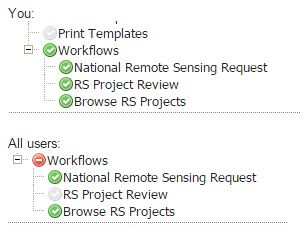 0
0 -
Actually, this really pertains to workflows... maybe it'll get you on the right track though?? However, I feel like with permissions on layers specifically, I have had to make separate viewers to avoid the conflict you are referring to. 0 -

Here's how we apply permissions: - Deny permissions trump allow permissions at the same level.
- Allow permissions trump deny permissions that are inherited.
--Ryan0 -
So the following should work?
Image 1 is for Group B which is denying general users access to the well sticks layer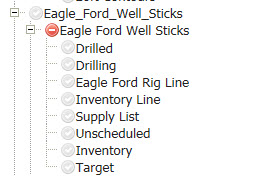
Image 2 is for Group A, granting select users (who are all also users of group B) access to the well sticks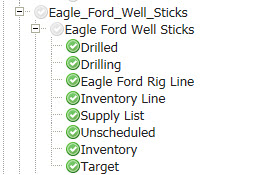
Both groups are also granted Site access, it's not implied.0 -
Scott, if you're still having issues then I can give you an answer to help get almost any kind of permission combinations but if you have what you want then I'll leave it be as it's a handfull to type out. 0 -
We got it working Matthew. It was just taking much longer thane expected for changes made in the AD groups to trickle through the system. Thanks though. 0
Please sign in to leave a comment.
Comments
6 comments