How to turn map tips off!

Hello. I must be missing something obvious here, but how do I turn map tips completely off in HTML5 2.5.2? I have no layers that have map tips enabled. However, in the viewer, if I have no sticky tool set, if I click anywhere on the map, it brings up the map tips results window that just says "No results". How do I stop this?
Thanks!
0
-

In the Layer settings on the details tab there's a checkbox to enable (or disable) map tips at the very bottom. 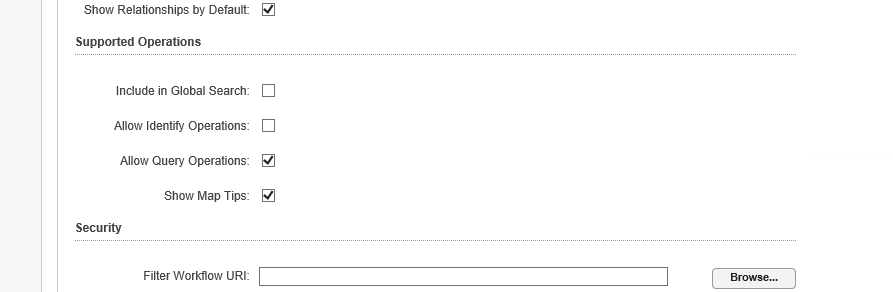 0
0 -
Thanks Rebecca, but I've verified that I don't have that box checked on any of my layers in the entire site. But I'm still getting the map tips window saying "No results". 0 -

In your viewer config file, search for InvokeMapTip, which is a command list in the MapOnClickBehavior in the Map module. If you delete InvokeMapTip, then map tips will not display when you click on the map. Just keep in mind that means that map tips won't work even if you have layers with map tips enabled.
{
"name": "MapOnClickBehavior",
"commands": [
"InvokeMapTip",
"ClearDefaultHighlights"
]
},0 -

You may want to do a quick search of your Site.xml for ShowMapTips="true" just in case you missed a base layer or something. 0 -
Dan, I verified there are no reference to ShowMapTips="true" in the site.xml.
John, thanks for the tip (no pun intended). I'll do that. I'm also going to submit it as an enhancement request for Latitude to build some logic into the ShowMapTips function to handle this situation.0 -
+1 to the enhancement request (I'm not sure where to find it or I'd +1 there instead). The No results window really gets in the way, but I still want my configured map tips to show. 0 -

Hi folks,
Enhancement requests will go into the Ideas section in the support center.
Chris' idea for the Show Map Tips is here:
https://support.geocortex.com/essentialsGSCIdeasDetail?c=09a6000000008RsAAI&id=08760000000bpOnAAI&sub-nav=ideas&main-nav=essentials0
Please sign in to leave a comment.
Comments
7 comments