base map widget - turn base maps off

The base map widget is great except there are some cases when a user does not want a base map visible so they can more clearly see the vector data being displayed. Is there any way to turn off base maps via the widget (rather than going through the layer list) instead of toggling between different base maps?
0
-

We created an empty tiled service and just named it 'None' in the viewer. It doesn't appear in the Layer List, only the basemap widget.
Added bonus: we used a tiling scheme for it that goes beyond the ArcGIS scheme, so the viewer gets additional levels of zoom.0 -
Great! What settings did you use for the map service/cache? 0 -
Same as our other tiled map services, we just don't generate any tiles.
We use our own custom tiling scheme for all of our cached service.
To create one of your own, use the 'Generate Tile Cache Tiling Scheme' tool with the predefined AGO/Google/Bing default scheme (default location: C:\Program Files (x86)\ArcGIS\Desktop10.3\TilingSchemes).
We added a couple more levels (1:564 and 1:282) and removed the world levels we don't use.0 -
Excellent! Works perfectly, thanks again! 0 -
We've found that the grey canvas basemap from ESRI is a good alternative to a blank map service. It contains a few place names and landmarks, but for the most part, is a light grey base. 0 -
Anyone have a better solution to this? Ideally the widget would just turn off all basemaps. Sometimes our viewer will lag when trying to contact the empty basemap service we use. Even though there are no tiles, it still calls the service. 0 -
I tried something similar with GVH 2.6.1. I had basemap with a few extra zoom levels in the tiling scheme but no tiles existed or were built at the extra/last two levels. But did not have much luck.
Case 1. If i had other basemaps with say n levels, then having one with n+2 levels did not matter. The last two levels were ignored.
Case 2. If I just had the n+2 level basemap with last 2 levels empty of tiles in the site and no other basemaps, the viewer showed only those two levels and nothing above it.
Note: We use custom tiling scheme based on state plane.
So is this fix still working in the latest release of Geocortex software?0 -
It's working for me in the latest version (2.6.1). Not ideal but the best work around I've been able to find so far. 0 -
Thanks Rebecca. I will try the completely empty tiled service like you and Dan are suggesting and see what happens. 0 -
This tip does not work for non web mercator tiling schemes - Tested in GVH 2.6.1 and 2.7 beta. 0 -
Works for me, and I'm using state plane. Dan, you might actually cache your service with white tiles and may open faster. Or just don't have that service available at the site open scale. I'm actually using a cached service that I use instead of a dynamic service when the site opens - I have it in the site twice, once hidden and always on, and the other in the basemaps group. Here is my site:
https://maps.srcity.org/Html5Viewer/Index.html?viewer=publiccity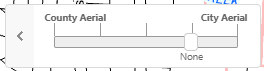 0
0 -
@Mike: we do the same thing now. I replaced the 'empty' service with a service of our county outline. It is also in the viewer twice, one always on and hidden in the layer list and one in the basemaps group to turn off the aerials. Kind of a waste of bandwidth, but the blank tiles are only ~1KB 0
Please sign in to leave a comment.
Comments
12 comments