Remove Facebook, Twitter, etc., but keep Email in Share Tool

I would like to remove Facebook, Twitter, Linkedin, and Google+ from the "Share" tool. I am only interested in keeping E-mail as a choice. I'm not sure if we're allowed to alter this tool. If this is not possible may I please add this as an enhancement request? Perhaps allow the admin. in Manager to choose from the five choices which ones you'd like to show. Regards, John
0
-
Good morning John,
I believe this can be done for each viewer by editing each of the json.js files located in the folder {instancename}\REST Elements\Sites\{SiteName}\Viewers\{ViewerName}\VirtualDirectory\Resources\Config\Default
Open each of the json files (Desktop.json.js, Handheld.json.js, Tablet.json.js) and search for "moduleName": "Share" which will look like this:{ "moduleName": "Share", "moduleType": "geocortex.essentialsHtmlViewer.mapping.modules.share.ShareModule", "configuration": { "shareOptions": [ { "id": "facebook", "displayName": "Facebook", "url": "https://www.facebook.com/sharer/sharer.php?u={ViewerUrl}", "iconUri": "Resources/Images/Icons/facebook-24.png" }, { "id": "twitter", "displayName": "Twitter", "url": "https://twitter.com/intent/tweet?text={ViewerUrl}", "iconUri": "Resources/Images/Icons/twitter-24.png" }, { "id": "linkedin", "displayName": "Linkedin", "url": "https://www.linkedin.com/shareArticle?ro=false&mini=true&url={ViewerUrl}", "iconUri": "Resources/Images/Icons/linkedin-24.png" }, { "id": "googleplus", "displayName": "Google+", "url": "https://plus.google.com/up/?continue=https://plus.google.com/share?url={ViewerUrl}", "iconUri": "Resources/Images/Icons/google-plus-24.png" }, { "id": "email", "displayName": "Email", "url": "mailto:?body={ViewerUrl}", "iconUri": "Resources/Images/Icons/Toolbar/contact-24.png" } ] }
All you will need to do is delete each of the objects in the shareOptions array that you don't want. Using your request, it should look like this:{ "moduleName": "Share", "moduleType": "geocortex.essentialsHtmlViewer.mapping.modules.share.ShareModule", "configuration": { "shareOptions": [ { "id": "email", "displayName": "Email", "url": "mailto:?body={ViewerUrl}", "iconUri": "Resources/Images/Icons/Toolbar/contact-24.png" } ] }
Hope this helps0 -
Thank you so much Marshall. It worked!
Thanks for the route to access it that you suggested. Once there, it was a breeze in Notepad++ to remove those.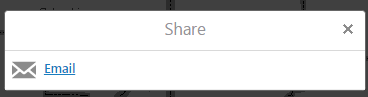 0
0 -
I ran into a problem with the fix outlined above of deleting the share options.
Every time I modified and saved the toolbar in essentials manager, the twitter, facebook, etc. options came back.
To stop that from happening I figured out with the help of another post here (https://support.geocortex.com/customer/apex/essentialsGSCForum?sub-nav=forum&main-nav=essentials&#!/feedtype=SINGLE_QUESTION_DETAIL&criteria=ALLQUESTIONS&id=906600000004IPwAAM) that the trick is to use the ShareOn command.0 -
This has worked great for me. Thank you for posting. I'd like to go a bit further and open the link in a new tab rather than in email (ie not use the mailto).
Does anyone have any ideas how to edit the command?0
Please sign in to leave a comment.
Comments
4 comments