File/Photo Attachment Upload Size

I'm receiving an error when trying to attach files/photos to a feature: "File attachment failed. Request Entity Too Large".
I am using Viewer for HTML5 2.5.1 and Essentials 4.4.3. I have checked my IIS settings and my ArcGIS for Server Services max upload allowances.
Is there a place in Geocortex that places a ceiling on upload size?
0
-
I'm also having a similar issue. When a user tries to upload a file larger than 10MB I get a 404 error message like the one below.
There was a workflow error running activity: Unable to load http://testmapitwest.fortworthtexas.gov/Geocortex/Essentials/REST/sites/RealProperty/workflows/Add_Appraisal_Document/run status: 404
I read articles like this one: http://www.webtrenches.com/post.cfm/iis7-file-upload-size-limits
thinking the problem was within IIS. Even though I've updated my IIS settings (per the article) to allow for larger files, the problem still persists. fyi I restarted IIS and Services since making this update.
I also tried tinkering with the actual website's maxAllowedContentLength settings, with no luck.
Any help would be really appreciated at this point!
SQL Server 2012R2, Essentials 4.4.3, HTML 2.5.20 -

I'm also trying to resolve this issue. As Laura mentioned, maxAllowedContentLength doesn't seem to do anything. 0 -
I believe you are experiencing this error because of a validation on your form item. Take a look at your workflow and choose the form item "FilePicker" if you went with the default name. Under "FilePicker" look for Validators, and click "add/remove Validation". From here you can change the size of allowable file uploads, the default is 10MB. Please see the screen shot below, mine is set for 2MB. 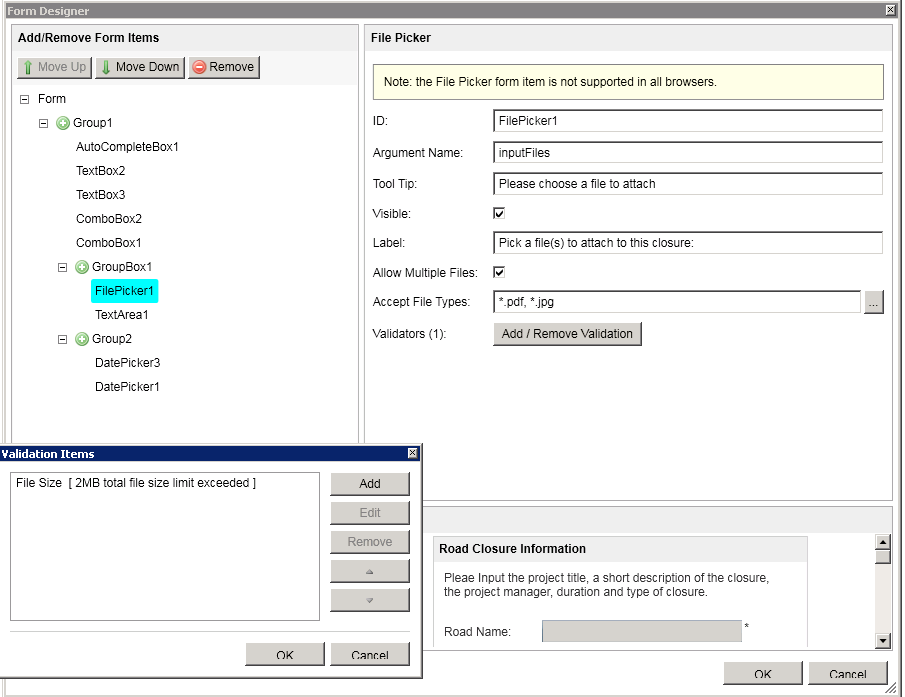 0
0 -
Hi all,
How can this be modified for an older version of Geocortex that does not have 'FilePicker' functionality but instead calls the 'SimpleOpenFileDialogTask' tools?
For more information, a similar question was posted here:
https://support.geocortex.com/essentialsGSCForum?sub-nav=forum&main-nav=essentials&#!/feedtype=SINGLE_QUESTION_DETAIL&criteria=ALLQUESTIONS&id=90660000000096vAAA0
Please sign in to leave a comment.
Comments
4 comments