Folder Names made BOLD in layer list

Hi all,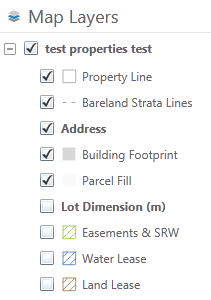
A colleague of mine, along with myself, have noticed that new versions of software, GE 4.4.3 and GVS/GVH 2.5.2, all make folder names BOLD in the layer list. This is especially problematic as it draws attention to itself, especially when you've hidden the 'child' layers that reside in the grouping. With 'child' layers hidden, we want the user to treat that folder group of layers, with the same level of importance as those layers that came before it and after it. The bolding draws attention to it unecessarily and causes confusion, especially when thinking in terms of an importance hierarchy. It als splatters black all over the layer list, making it difficult to interpret what's going on.
Has anyone figured a work-around for this? Is there a setting I'm missing?
I appreciate your time and interest in the topic,
Thanks for your input,
Jesse
0
-

Hi Jessie,
There isn't a setting to control the formatting but it can be changed via CSS. To change it permanently in all sites you would edit the common.css file in C:\inetpub\wwwroot\Html5Viewer\Resources\Styles and look for the following entry:
.parent-layer {
font-weight: 600;
}
changing the weight to 400 should give you the results you want.
You can also over-ride one particular site by editing -
C:\Program Files (x86)\Latitude Geographics\Geocortex Essentials\Default\REST Elements\Sites\LA_County\Viewers\LA_County_HTML\VirtualDirectory\Resources\Styles\Custom\Desktop.css
and adding the same piece of code with the 600 changed to 400.
Changing CSS is a bit tricky, you may inadvertently change styling on text you did not intend on changing so I would recommend lots of testing after making any changes and keep backup copies!
Also note that future upgrades may over-write any changes so I would document what you do in case it needs to be re-done.
Regards,
?Wayne Richard
Latitude Geographics Group Ltd.
Head Office: 300 – 1117 Wharf Street Victoria, BC Canada V8W 1T7
Tel: (250) 381-8130 | Fax: (250) 381-8132 | wrichard@latitudegeo.com
Developers of Geocortex web-based mapping software | www.geocortex.com
An Esri Platinum Business Partner0 -
Hi Wayne,
Thanks so much for the quick response. I've followed your folder path, but unable to find the Styles folder following the directory path of my Silverlight Viewer. Is this viewer configured differently than HTML5 such that there is no Desktop.css file to revise? Is there another file folder structure I need to navigate to for Silverlight?
Jesse0 -
Hi Jessie,
I jumped the gun and assumed you were using an HTML5 viewer. You cannot change CSS to update the styling of the Silverlight viewer like you can with the HTML5 viewer. I would suggest you post a request to the "Ideas" section of the Support Center.
Regards,
Wayne0
Please sign in to leave a comment.
Comments
3 comments