Control Zoom when click on Geocode result

Can I control the scale that my application zooms to when clicking on a Geocode result (through the Global Search)? For most cases the application zooms out. When clicking on a non-address locator feature that was returned in a Global Search, the applicaiton zooms to the feature extent, which is the desired result.
Any help would be appreciated.
Thanks, Bobby Jo
0
-

I would like to know about this as well. 0 -
Me too. 0 -
If the feature is a line or polygon, then it should zoom tip extent. For point layers you can define the scale you want it to zoom tip in the layer details. 0 -

You can set mins/maxs in the locator used for the geocode service that will define the default extent returned for your points. Check the documentation for whatever type of geocoder you are using. I don't think you can set this using Geocortex yet. 0 -
Figured it out. You have to change this setting in the Viewer.xml.
DefaultPointFeatureZoomScales="5000" changed it to 500 and when doing a global address search against the geocoder it now zooms in close.0 -
And for the HTML5 viewer modify the .json.js file
"geolocateExtentZoomLevel": "1000",0 -
In GVH2.6.1 the Pointfeaturezoomscales have no effect on my geolocate results from globalsearch.
The geocode results contain the pointgeometry location, and the extent.
http://services.arcgisonline.nl/arcgis/rest/services/Geocoder_BAG_RD/GeocodeServer/findAddressCandidates?Adres=dam+amsterdam&Postcode=&Woonplaats=&SingleLine=&category=&outFields=&maxLocations=&outSR=&searchExtent=&location=&distance=&magicKey=&f=pjson
{ "spatialReference": { "wkid": 28992, "latestWkid": 28992 }, "candidates": [ { "address": "Dam, 1012 Amsterdam", "location": { "x": 121347.00074056617, "y": 487390.99683586147, "z": 0 }, "score": 100, "attributes": { }, "extent": { "xmin": 121047.000741, "ymin": 487090.99683600001, "xmax": 121647.000741, "ymax": 487690.99683600001 } } ] }
But it will always zoom to a fixed scale. In the example with a SRID 28992 basemap + geocoder, it zooms always to 1:6000.
Is there a way to let it zoom to the given extent (or near to it?)0 -
Edit, geolocate --> geocoder results 0 -

1:6000 is one of your tile level scales? As you probably know, you cannot zoom inbetween tile levels? 0 -
Just a simple testsite:
Basemap: http://services.arcgisonline.nl/arcgis/rest/services/Basiskaarten/Donkergrijze_Canvas_Referentie/MapServer (which includes 6000)
Geocode service http://services.arcgisonline.nl/arcgis/rest/services/Geocoder_BAG_RD/GeocodeServer
And DefaultPointfeaturezoomscsales:
"defaultPointFeatureZoomScales": [
500
],
Using globalsearch --> result -- > select result It will zoom to 6000. No matter what value at defaultpointfeaturezoomscales or extent in the geocorder result.0 -
For GVH. this has previously been reported as a bug, the bug number is GVH-6510. As of today it is not resolved nor does it have a planned version.
Regards,
Wayne Richard
Latitude Geographics Group Ltd.
Head Office: 300 – 1117 Wharf Street Victoria, BC Canada V8W 1T7
Tel: (250) 381-8130 | Fax: (250) 381-8132 | wrichard@latitudegeo.com
Developers of Geocortex web-based mapping software | www.geocortex.com
An Esri Platinum Business Partner0 -
+1 for GVH-6510 0 -
@Latitude, what is the current status for this bug? 0 -
This was implemented as a new feature in Essentials 4.7 and HTML5 viewer 2.8 (as GVH-12507), though it doesn't appear in the release notes or documentation. As of these releases, you can edit your geocoding service and fill your desired scale in the Feature Zoom Scale. Here's a screenshot where I've set feature zoom scale for the ArcGIS Online Geocoding service in the sample LA County site (note that I've also included it in the global search): 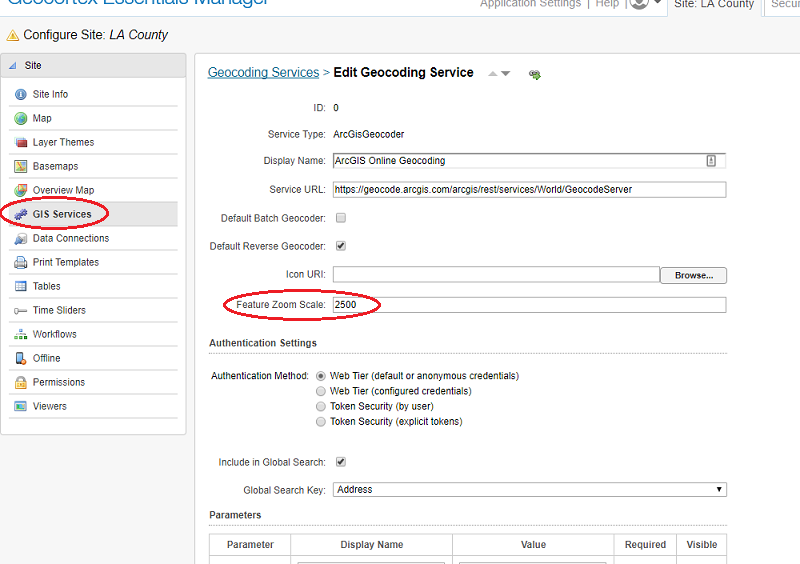
Now, when searching in the viewer, clicking on a geocoding result will zoom you to the scale (or closest possible scale, if you're using tiled basemaps):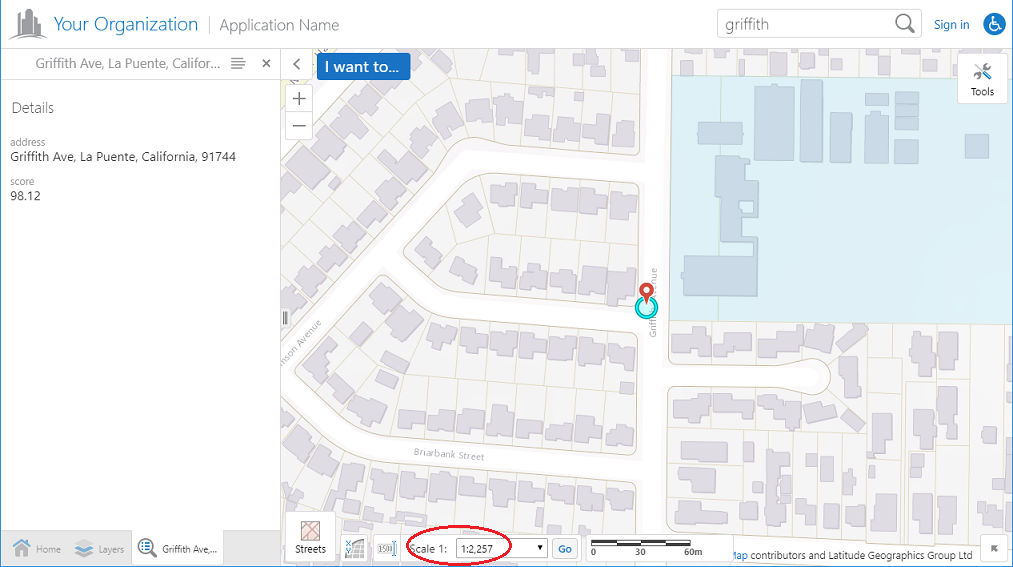
I've filed an issue to have this enhancement documented.0
Please sign in to leave a comment.
Comments
14 comments