Cannot get aerial to stay visible when zoom in

If you set the service to have a Maximum Scale in ArcGIS Server that is beyond what you have cached, in Silverlight 2.5 you can zoom to the Max Scale and the viewer will zoom in and still show the aerial. As an example, I've cached an aerial to 150, but have set the Max Scale to be 49. In Silverlight, this means a user can zoom in to 50 and still see the aerial. This is useful for measuring. It appears that HTML5 2.5.2 is bound to the actual cached scales? There is no way to zoom to a scale in between cached scales or zooming in closer?
0
-
I think I had the same or similar problem and I ended up fixing it by removing the permissions on the aerial image. We are using ESRI aerial imagery from the following URL:
https://services.arcgisonline.com/arcgis/rest/services/World_Imagery/MapServer
Here is how I have the permissions configured. We are using windows auth and secured services.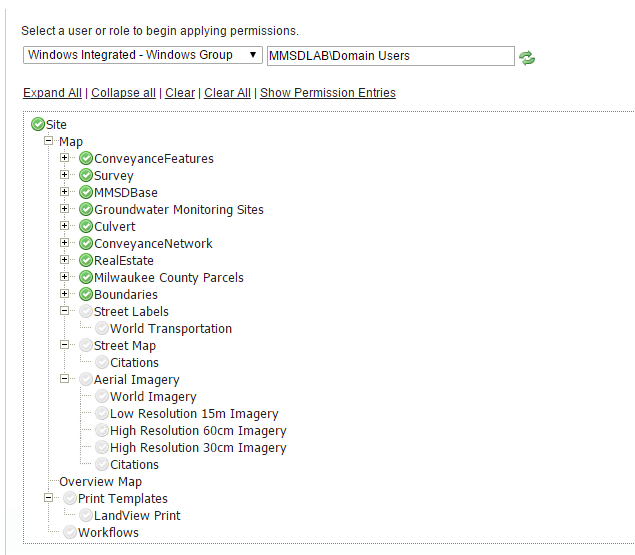
The map scale overide is not needed with the HTML5 viewer. I blanked mine out: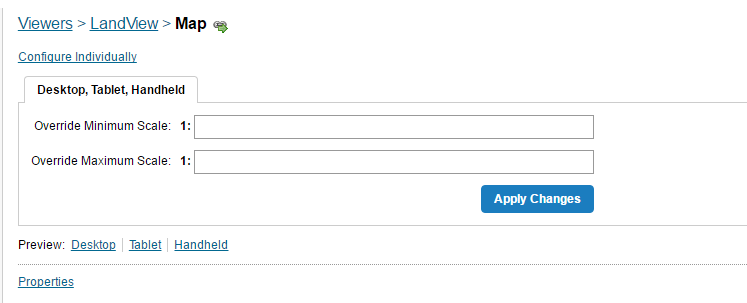
After doing those, I am able to zoom in much farther than the ESRI tiles. Before the map would try to draw and say "Data not yet available" or something close to that. Now it just zooms closer.
So there could be something with either the service (http vs https) or the permissions for the viewer.
Hope this helps.0 -
Jon,
Thanks for the reply, but I don't think it helps. I'm not using permissions on this site, since that can cause big slow downs. I tried removing the Min/Max scale override in Manager on the Map tab, but all that does is prevent the map from zooming in closer than the least most detailed aerial...0 -
I have an non-https site here at the link below, so maybe the security does not matter, but I do keep the green check box off on the permissions.
http://maps.mmsd.com/maps/?viewer=freshcoast740
That site uses the non https ESRI aerial at the following URL and allows a pretty close zoom.
http://services.arcgisonline.com/ArcGIS/rest/services/World_Imagery/MapServer
This zooms pretty close. Are you looking to get closer than this?0 -
Yes, our new imagery has .15' pixels... In Silverlight, you had the option to either force the viewer to only allow the user to go to scales that have been cached, or you can allow them to go to scales between the cached scales. This allowed you to set it so the viewer could also zoom in closer than the max cached scale. Seems you don't have that option in HTML5 (LG folks?).
I ended up getting around this by adding a new scale (1:75) to our cache over the weekend. 14 hours and 80 GBs later, it seems to be working okay now. This is the first time this particular vendor has ever done a city aerial at this resolution - it is really quite impressive:
https://maps.srcity.org/Html5Viewer/Index.html?viewer=parcel0 -
lol.... I guess making a new cache is one way around it.
You are lucky you have that option. Not all of us can just burn up an extra 80gb when needed.
We used to use the same silverlight functionality to zoom in. We also switched to HTML5 and I think you are correct in stating the same functionality is NOT in the HTML5 viewer.
btw.. The new aerials turned out nice. good job.0 -
Thanks. Yes, not what I wanted to do...but I'm now doing it to our most recent county-wide aerial as well, and that will likely be around 120 GB... Between the two, an extra 200 GB in storage... 0 -
We ran into this issue with the HTML5 viewer too.
Our workaround was to create a new dynamic map service that displays the source mosaic dataset for scales lower than our cache (1:500).
Whilst serving raw imagery dynamically isn't ideal, the number of imagery tiles visible for any given request below 1:500 is, at most, going to be 4 and we have found the performance to be only marginally slower than the cache.0 -
Charlie Brown! I live in Santa Rosa, where Charles Shultz did his work. Your solution sounds like what I used to do in the old MapGuide 6 days. I would use different resolutions of MrSIDs, and then when I got close, I would switch to TIFs.
I originally cached my aerials to their closest usable scale. Our folks like the ability to zoom in closer than that, especially when measuring stuff. This issue with HTML5 not being able to zoom between cached scales is a pain. I have over ten aerial services, and I'm not about to cache an extra scale for each...so I ended up just doing my most current City and County aerial. My main web site (not the one I gave above) has over 15 services, and some of them have a lot of layers - I really don't want to have to add additional dynamic services, or to add to the existing ones, the ten or so aerials I have on the site...0 -

Hi Folks,
The underlying issue is that the Esri javascript map object will only show you tiles at the available scale levels published by a map service.
The "stretchy tile" behavior in Silverlight is what gives us the ability to zoom past the last available scale level in a cached map and still see tiles. It's also called tile interpolation and is not available in the javascript API. When you zoom beyond the available scale levels in a tiled service with the Esri javascript API, the map turns off.
For a bit more information on snapping to levels, read here:
http://gis.stackexchange.com/questions/52826/why-is-there-no-map-snaptolevels-property-in-the-esri-js-api0 -
Thanks for the explaination Malcolm. Sounds like HTML5 will never be able to interpolate between cached scales - a big drawback in my mind... 0
Please sign in to leave a comment.
Comments
10 comments