Remove "View Additional Details" link map tips pop up?

Is there any way to remove the "View Additional Details" link on the map tips pop up? I have turned off the visibility for all of the fields so nothing shows up in that area, but I want to now completely remove that hyperlink on the map tips. TIA
0
-

You need to modify the json of your viewer, so make a backup first.
Under the Menu module there is 'MapTipActions' (search for "id": "MapTipActions") that lists the available actions..
Remove the section for the addtional details, being mindful of brackets and commas:
{
"text": "@language-menu-maptip-actions-view-details",
"description": "@language-menu-maptip-actions-view-details-desc",
"iconUri": "Resources/Images/Icons/arrow-right-alt-24.png",
"hideOnDisable": false,
"batch": [
{
"command": "ShowFeatureDetails"
},
{
"command": "DeactivateView",
"commandParameter": "MapTipView"
}
]
},0 -
Hi Tara -
At present the only way to delete an item from the Map Tip Actons menu is to modify the viewer's JSON files in accord with Dan's advice. For GVH 2.7, we are working on an improvement that will allow you to edit items for this and related menus through the Management Pack's user interface. This function will be similar to that currently available for I Want To Menu and the Map Context Menu.
Regards,
Steve0 -
Steve, do you know if this functionality has been added to 2.7.1? I was searching for it in the Admin and Developer Guide, but I'm not finding it. Perhaps I'm not searching on the correct terms? Thanks! 0 -
Hi Tara,
As of 2.7, you can edit the map tip actions in Manager via the Context Menus page. This is covered in the Admin and Dev guide in section 14.9.
Hope that helps!0 -
Jordan,
What's command and command parameter to get it back if accidently removed. I checked another one of our sites and below you can see the settings. However, this won't work to get it back, it requires the command field.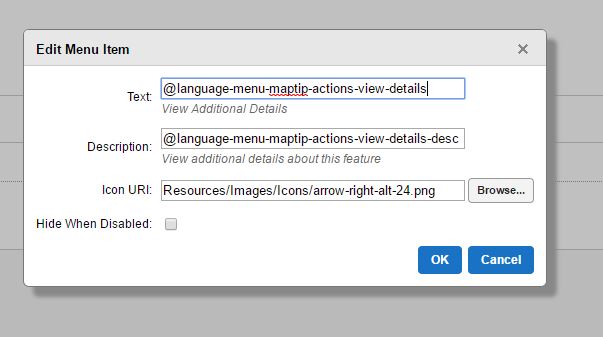 0
0 -
Hi Scott,
The command is ShowFeatureDetailsFromMaptip, and the parameter is blank.
I hope that helps!
Thanks,
Danny0
Please sign in to leave a comment.
Comments
6 comments