Pass Attribute from Mouse Click into Workflow

I have a web map that displays restaurant information and would like to allow users to submit a complaint about the restaurant. When a maptip opens, I have configured a hyperlink that launches a workflow that allows users to submit the complaint. What I am struggling with is how to pass the record id from the restaurant that was clicked into the workflow. I cannot paste my workflow here because it is more then 32,000 characters but here is a screenshot of it. At the end, I just have an Alert that I would like to display the recordID so I can confirm that the correct recordID is being passed.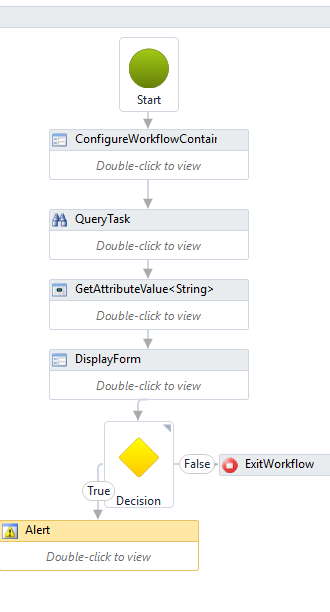
0
-
I'd suggest passing arguments:
<a href="command:RunWorkflowWithArguments?workflowId=CPG_DriveTo&argX={WOXCOORDINATE}&argY={WOYCOORDINATE}&argID={WORKORDERID}">Drive To </a>
Then in your workflow add the arguments (direction In) with the same name and use them like variables.0 -
Hi Geoff, Thank you for the response! So I"ve created a simple Alert workflow to test your suggestion... 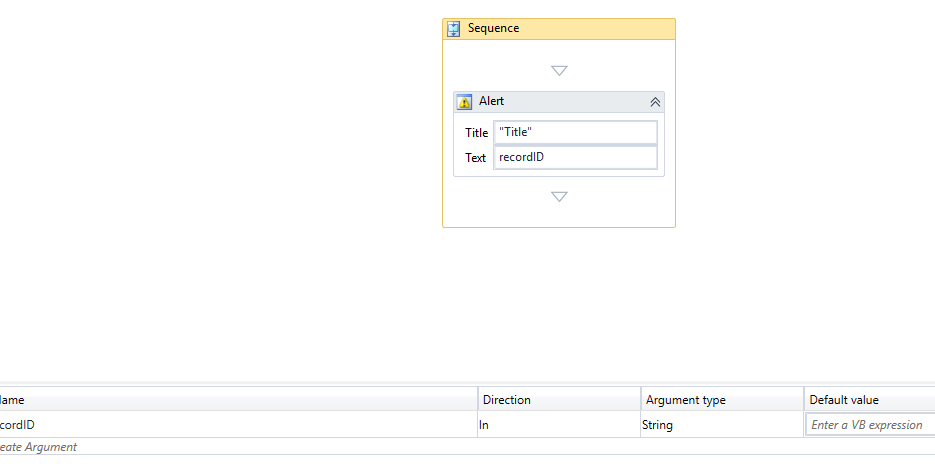
Added the workflow to manager...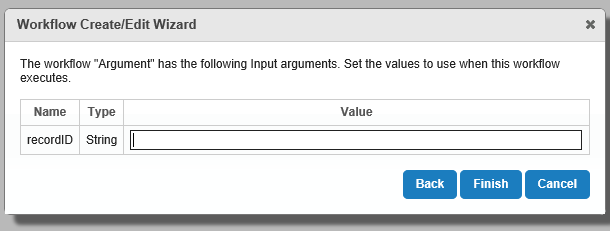
And added the hyperlink in the feature long description...
<a href="command:RunWorkflowWithArguments?workflowId=Argument&id={recordID}">Argument</a>
However, the Alert is still showing up blank...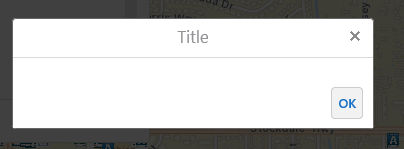
Any suggestions?0 -
Nevermind, I figured it out. My problem was in the hyperlink in the feature long description...I had this...
<a href="command:RunWorkflowWithArguments?workflowId=Argument&id={recordID}">Argument</a>
and I should've had this...
<a href="command:RunWorkflowWithArguments?workflowId=Argument&recordID={recordID}">Argument</a>0 -

& not required use: <a href="command:RunWorkflowWithArguments?workflowId=Argument&id={recordID}">Argument</a>Just to be sure, you configured your worklow to accept arguments in the Geocortex Manager. Did you put in a test value?0 -
Glad you found it Lisa! 0
Please sign in to leave a comment.
Comments
5 comments