How to Update Editable Layer Attribute Value?

I’m a Sys Admin and Geocortex ended on my lap because I’ve installed it on a server so please excuse me if I don't properly use GIS/Geocortex terms as I'm not a GIS or Geocortex developer.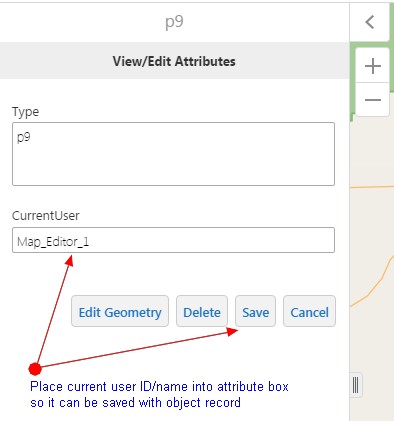
We have a Geocortex application with editable polygon layer with data coming from geo database stored in SQL Server. We want to track which user adds/edits polygons and for that “CurrentUser” column was created in SQL and is exposed as layer attribute.
I can retrieve current user ID in workflow and place it into alert but I don’t know how to populate attribute textbox in workflow task with current user ID/name.
I would greatly appreciate if someone could tell me high level steps I need to take or sequence of workflow tasks to use. Maybe you have an example workflow that comes close to what I want to achieve.
Attaching screenshot to clarify my question, if that can help. Thanks much.
0
-
Hi Steve,
You want to use the "Get Current User" activity to grab the current username. Then with this variable, you will have to add it to the attributes of the corresponding features. So you want to use the Query Task to find the feature you are editing. Then using an Assign activity, you want to assign the username to a column in the feature set. Once you have assigned it to that feature set, you will have to use the Update Features activity to commit the changes. This code gallery sample demonstrates how to update/add/delete features in a feature set: https://support.geocortex.com/essentialsGSCCodeGallery?sub-nav=codegall&main-nav=essentials&#!/feedtype=SINGLE_ARTICLE_DETAIL&criteria=BESTANSWERS&id=kA4600000004EWUCA2
With ArcGIS Servers, they have a tool called Editor Tracking that automatically tracks who makes updates when. So this might also be worth looking into. If this works out, then you will not need to create a workflow to track the user yourself.
I hope this helps.
Regards,
Carmen0 -
Hi Carmen,
Thank you very much for the suggestions. I definetely will investigate both options and post my progress. Thanks again.
Regards,
Steve Dobrioglo0 -
Update on using Editor Tracking option.
Our GIS coordinator enabled Editor Tracking in ArcGIS feature service however it doesn't work from Geocortex Essentials.
Date fields in geodatabase get updated correctly but user fields get populated with "Esri_Anonymous" value regardless if Windows Integrated or Geocortex Identity server is used for permission.
So I guess the only way to do it through workflow.
It would be great if Geocortex support person could weigh in and tell if it's even possible to get Essentials work with ArcGIS Editor Tracking.
Thanks.0 -
Hi Steve,
I asked another colleague about how to set up Editor Tracking with Essentials and this is what he said:
To get Editor Tracking to work, you need to use Web Tier Security on the ArcGIS Server (using Windows Security). It will not work with Token Security or anonymous. This is all you need to do if you are not using layer-level security.
If you are using layer level security, then you need to enable Impersonation in Essentials Manager so that it can pass the appropriate credentials back to the ArcGIS Server. For more information on Impersonation, you can consult the Geocortex Essentials Admin Guide under section 32.2. This will only work with Windows Integrated Security on the Geocortex Essentials side.
I hope this makes sense.
Regards,
Carmen0 -
Hi Carmen,
Thanks for the response. I'll try to sort it out and give it a try.0 -
Any luck developing this workflow? We are looking for the same solution for the same reasons.
Thanks,
Terry0 -
this question floats around the forums continuously - there should be a better way to search for this solution
As mentioned above, the easiest way to track users is to use the "get current user" activity in your workflow , though this only works if your users are signed into your application (otherwise the default is ESRI anonymous).
You do not need to set up editor tracking in ArcGIS server to use "get current user" you just need to assign this activity to a variable in your workflow. It will not track edits if you use the inbuilt editing tools (as I do) for edits. If you want to track usernames for edits you must built edits into your workflow
If you enable editor tracking in ArcGIS server and your users are signed in I imagine it would track creation/edits using the inbuilt tools - I was never able to get my admin to work with me on this0 -

Using the OOTB editing tools and ArcGIS server editor tracking, it will populate the credentials used to access the feature service (which you put in when adding the service to the viewer in Essentials). I'm not sure you could override this with a workflow, I think you would need a separate field to capture the workflow user.
If you need to track multiple users and don't want to use a workflow, you would have to add the featureservice mutliple times with different credentials and then control access in the viewer through a security provider.0 -

We use the workflow method for datasets we edit exclusively in GE apps and editor tracking for datasets we edit exclusively in ArcGIS for Desktop. But a problem arises when we have dataset that we want to edit in both environments. Obviously the workflow has no impact on desktop editing, and Editor Tracking trumps anything we do with a GE workflow.
Switching from GIS-tier to Web-tier authentication might be an option for some, but according to a technical article from Esri (https://support.esri.com/en/technical-article/00001183 (https://support.esri.com/en/technical-article/000011833) :
"For web-tier to function, it is required to turn on Windows Authentication and disable anonymous authentication in IIS. As a result of disabling anonymous connections in IIS, there are no unsecured services."
That's a showstopper for us because we have a mix of secured and unsecured services, the latter being used in our public ArcGIS Online web maps.
But to be fair to Latitude, this seems like an issue of competing functionality between two different applications, not a shortcoming in how GE performs.0
Please sign in to leave a comment.
Comments
9 comments