Close Map Tip when View/Edit Attributes panel appears

I want to close the Map Tip automatically (without the user clicking on the X) when I click the "Edit Project" button and the View/Edit Attributes panel appears. Please see screenshot below.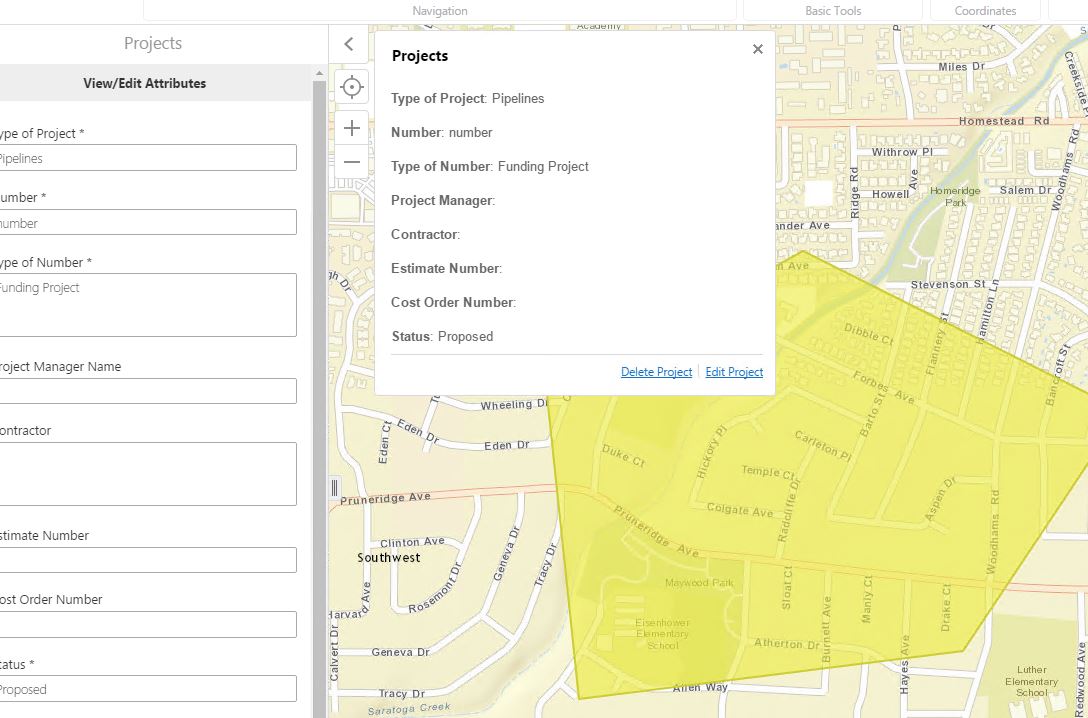
Is there a way to do this? Do I do this in the Desktop.json file?
Thanks
0
-
I figured out how to do this:
In the Desktop.json config file, I added two commands under the "Editing" Module: "HideMapTips" and "EnableMapTips". The "HideMapTips" command hides the MapTip once I click on the "Edit Project" button. Adding the "EnableMapTips" command allows for you to click on the same feature (or another feature) to open a MapTip.{ "moduleName": "Editing", "moduleType": "geocortex.essentialsHtmlViewer.mapping.modules.editing.EditingModule", "configuration": { "behaviors": [ { "name": "EditorFeatureSelectedBehavior", "commands": [ "ZoomToFeature", "SetActiveHighlightLayerDefault", "ClearHighlights", "HighlightFeature", "HideMapTips", "EnableMapTips" ] }0
Please sign in to leave a comment.
Comments
1 comment