connect to secure map services

Hello All -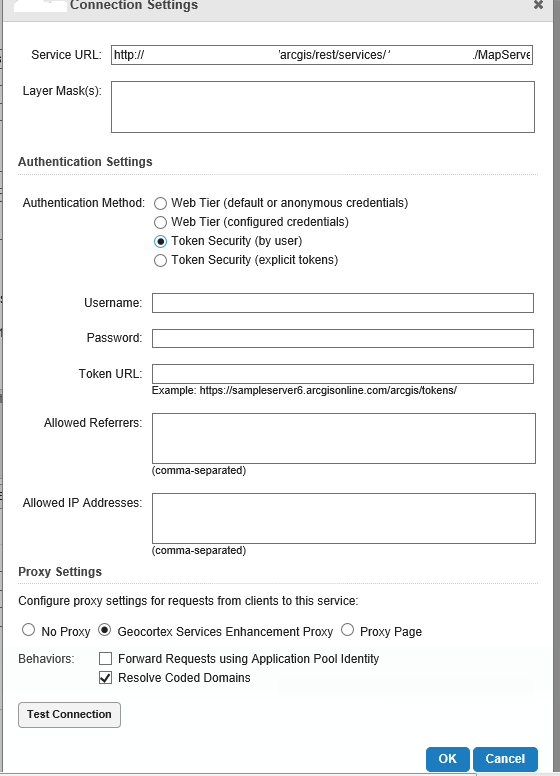
I seem to be having trouble understand how Rest Manger in Geoccortex Essentials wants to connect to my secure map services. To me, the help isn't helpful, but maybe I am miss-understanding something.
I have a secure map service, that is secured by ArcGIS Server, so therefore my security is ArcGIS Server with Authtication set to ArcGIS Tokens. What I don't get from the help file is how the connection is supposed to be made. I think I am using the correct menu shoice, but I am not understanding how Rest Manager wants the connection.
do I put in my ArcGIS User Name and Password, then the URL to the token site, but where does the token come in? Do I pre-generate a token and append it to the URL?
I need an example connection page for this type of set up. kind of the KISS approach.
Thanks for the help.
Joe
0
-

We use token security by user and only put in the username and password. 0 -
I tired that but it came back with connection failed. 0 -
What version of GE are you on? I would check the section of the Admin Guide regarding the Enhancement Proxy. I think there are extra requirements for secured services when using that proxy. 0 -
I also found the help on this topic less than helpful, but got some insight from a colleague.
Our solution has three parts, all of which revolve around the use of a service account (we created a service account to be used as the ArcGIS Server account).- Grant the service account permission to access the secured service.
- Set the Essentials app pools identity so they run as the service account.
- Connect to the secured service using web tier (configured credentials) and use the credentials of the service account.
0
Please sign in to leave a comment.
Comments
4 comments