Save Projects to File Share Server

Hi All
We are running our GXE production environment as a cluster, and we are seeing some inconsistencies in regards to the Save Project function.
Firstly when you try to save a project the final dialog box, where you set you share options, doesn't always display correctly and the only thing that is shown is a close button.
_img_ alt="User-added image" src="https://latitudegeo--c.na53.content.force.com/servlet/rtaImage?eid=90660000000XbMG&feoid=Body&refid=0EM60000000XvNw" _/_img_
Secondly when a user hits the open button, sometimes it will show that there are no projects to open, however, if you hit refresh a couple of times then the list is of available saved projects is display.
_img_ alt="User-added image" src="https://latitudegeo--c.na53.content.force.com/servlet/rtaImage?eid=90660000000XbMG&feoid=Body&refid=0EM60000000XvNr" _/_img_
I am just wondering if this is to do with the environment being in a cluster? I haven't seen any of these issues in our single server dev/test environment. I should note that, as far as I can tell, that our cluster is otherwise running properly. There are no issues with logging in, running workflows or requesting print jobs etc.
So I was thinking that it might be better to have GXE save the project files to our network file share server, where the sites folder, workflows and template are all stores. Is this even possible? Has anyone else experience problems with the Save Project function in a cluster environment?
Would appreciate any feedback.
Cheers
Chris
0
-

Hi Chris,
It sounds to me like you are correct, and this is related to Essentials being in a cluster. Can you please let me know how you went about setting up your cluster? Did you follow the steps in the installation guide, or did you use a different method?
The saved projects are stored in Elastic Search (which is a component of Core). It sounds almost like Essentials is clustered, but Core is not. One way to verify this is to go to http://localhost:9200/_plugin/head/ on each of the servers in the cluster. If the status is Yellow, then Elastic Search is operating independently from the other server, and your projects are not being synchronized (which would explain why you only see the projects occasionally, after refreshing a few times). If the status is green on both servers, then Elastic Search is clustered, and the problem lies elsewhere.
Running Elastic Search from a network share is not supported unfortunately, so using a network share is not recommended.
I hope this helps!
Thanks,
Danny0 -
Hi Danny
There doesn’t seem to be any installations guides on set up a cluster environment. However, I did get technical support from our local resellers to help set this up.
We ran the GXE installer on the first server, but didn't run the PI initially, we then ran the geocortex.core installer separately and set the cluster name, then ran the PI. On the 2nd server we followed the same steps and joined the Cluster we set up during the first install, then ran the PI.
Following what you said our cluster health on both servers indicates itis Yellow, and it would appear that ElasticSearch isn’t participating in the cluster after all.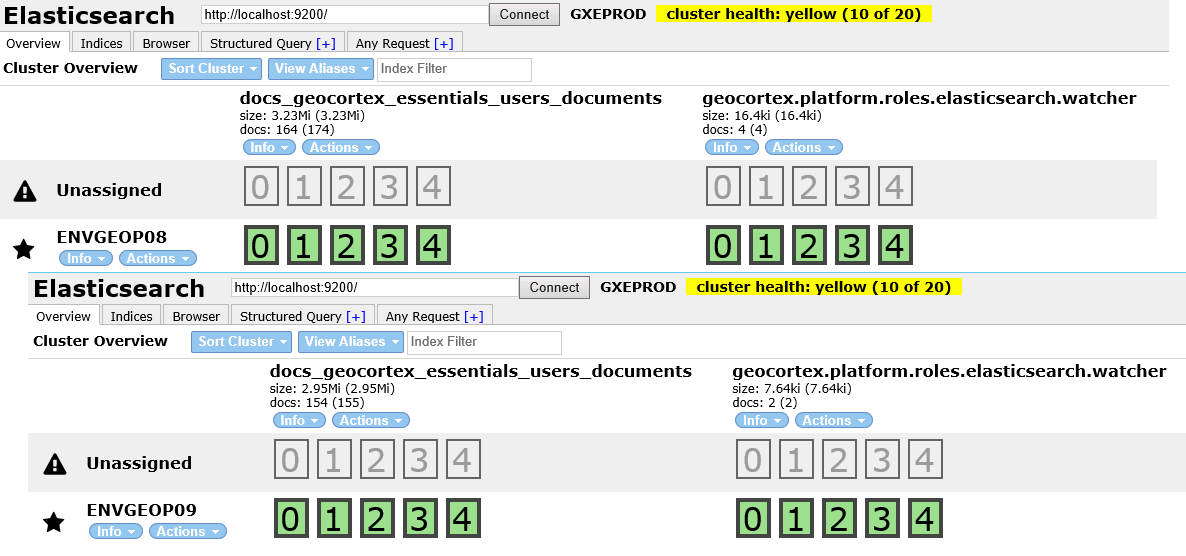
Is there a straight forward way to rectify this, and get core/elasticsearch to join the cluster? Or does it mena an unistall and reinstall??
Cheers
Chris0 -
Hello Chris,
We may be able to get them clustered without a reinstall, however, it will be hard to do without looking at the environment. I would suggest opening a ticket with your reseller, (pointing them to this thread) and they can assist you with getting this working. If further assistance is needed, they can open a support case with us on your behalf.
Thanks!
Danny0 -
Chris,
Just wondering if you could shed some light on the Installation to a clustered environment? I'm starting to look into this, and as you say, there seems to be little on it in the installation notes!
I can raise a ticket with AAM if that suits, but if you have a doco lying around that would be great if you don't mind sharing ; )
cheers
Gareth0 -
Hi Gareth
Happy to provide some learnings! Send me an email (chris.roberts@sa.gov.au (To: chris.roberts@sa.gov.au) mailto:chris.roberts@sa.gov.au).
Cheers
Chris0
Please sign in to leave a comment.
Comments
5 comments