Layer theme not displaying some layers

Even though the annotation layers are on in the layer list, they do not display on the map. I have confirmed in manager that they are included and checked on for that layer theme. Is this a bug? 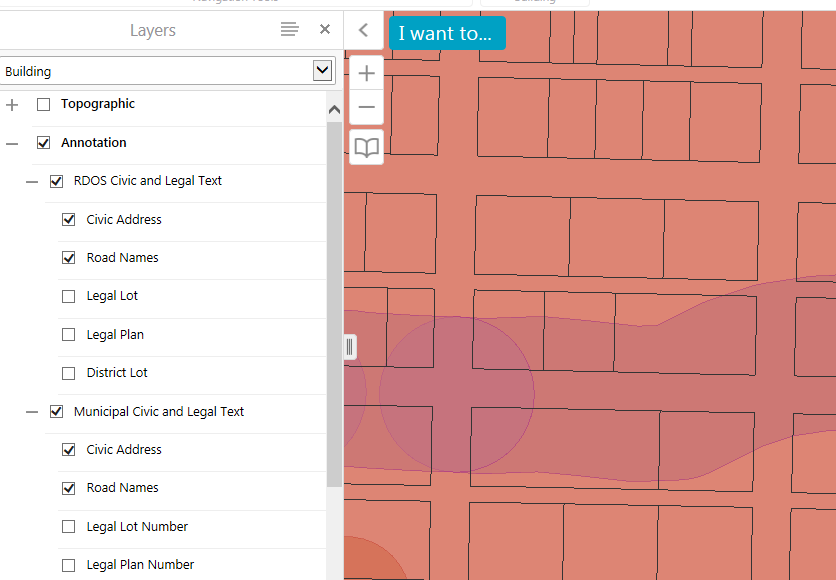
0
-

Hi Rebecca,
I am unable to reproduce the issue.
I was wondering if you could share your map service (if it is public)?
And which GE/GVH versions that you're seeing the issue?
My email is pmason@latitudegeo.com
Kind Regards,
Pairin
0 -
I'm using the latest versions of the software (GVH 2.6.1 GE 4.5.1). I created a brand new layer theme and it's working correctly. The issue was with an existing layer theme that I tried to add a layer to. Although it's showing as 'on' in the layer list when the layer theme is activated, the data is not displayed on the map (in this case it's an annotation layer). Creating a new one fixed my problem but I would assume it should be possible to include new layers in a existing layer theme without experiencing this issue. 0 -
Hi Rebecca,
Thank you for providing detail regarding this issue.
I was able to reproduce in GVH2.6.1/GE4.5.1.
Fortunately, the issue is fixed and should be included in GVH2.7 final release.
Please feel free to us me know if you still see the issue.
Cheers,
Pairin
0 -
Hello Pairin,
I am having this same issue. I have upgraded to 2.7 and it is still happening. I followed Rebecca's advice by just creating a brand new theme and it solved the problem - but I agree with her final statement.0 -

Hi Stephanie,
We have a bug ticket open with our developers to review this issue with upgrading and the layer themes not functioning correctly. Unfortunately, the only work around is what you had to do, create all new layer themes.
Thanks,
Mike Ketler0 -
We are on 2.7.1 Viewer and 4.6.2 Essentials and are now experiencing a "bug" when a brand new layer theme is added, it's turning on layers that I have designed off when I hit Apply Changes. This is happening in our Development Environment, Staging and Production. The existing Layer theme is fine, however I am not making any changes to the existing layer theme. If I delete the 1 layer theme I have, and then generate a new layer theme, I experience the same issues. Layers turned on that I have just designated to be off. 0 -
Hi Melanie,
I have tried to replicate your issue but I haven't been able to do so. Do you have a public facing site that you can refer me to?
Also, can you clarify a little more on your issue? When you are creating your layer themes, are you adding new services and layers to your site at the same time, or using existing services?
Do you have nested layer themes (i.e layer themes within layer themes)?
My email is mbishop@latitudegeo.com.
Thanks,
Marion.0 -
I am experiencing a "bug" when a brand new layer theme is added or existing layer theme is modified. The layer theme is turning on layers that I have designed off when I hit “Apply Changes”. This is happening in our Development Environment of essentials manger. If I delete the 1 layer theme, and then recreate it as a new layer theme, I experience the same issues. Layers turned on that I have just designated to be off. The layer theme is using existing services in the map; some of the services are from reference sites, and some are not. 2.9 Viewer and 4.8 essentials. 0 -
Hi Melanie,
I took a look at our records, it sounds like we've been in touch and have this filed as GE-8761. Sounds like it likely has to do with site inheritance. If you're looking for more stuff to try, I've seen layer theme issues pop up in Manager specifically when you're hiding folders or layers in the layer list.
Thanks
-Amanda0 -
Hi Amanda,
we recently updated to GE4.9.1 and GHV2.10.1 and noticed similar issue in some of our sites. Where I could find more infomation about GE-8761 (I couldn't find it in the release notes). Thanks.0 -

Hi Jack,
The GE-8761 is "Exclude sub layers in Layer Theme fails to exclude layers that are not shown in the layer list". The hidden layer is still visible in the theme even excluding sub layers in layer theme.
Long0
Please sign in to leave a comment.
Comments
11 comments