Scalebar land Scale Input Text overlap

I am fairly new to GE (GE 4.5.0, GVH 2.6) and I am having an issue with the scalebar overlaping the scale input text. There was a post similar to this in the community where the recommendation was to reorder the "scalebar" module in the json file. I have moved the "ScalebarView" to the last item below teh "ScaleInputBoxButtonView" and the "ScaleInputBoxView" but that did resolve the problem. I have done this in the Desktop.json as well as the DesktopPreview.json files, do i need to also delete the backup files in order for this to work?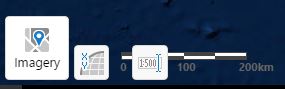
0
-
Yes, that does look odd. You shouldn't need to delete the backup files, though. Would you mind posting the json for your scalebar module in desktop.json.js? 0 -
Hi Jordan,
Thanks for the reply. Here is the scalebar module below:
{
"moduleName": "Scalebar",
"moduleType": "geocortex.essentialsHtmlViewer.mapping.modules.scalebar.ScalebarModule",
"configuration": {},
"views": [
{
"id": "ScaleInputBoxButtonView",
"visible": true,
"type": "geocortex.essentialsHtmlViewer.mapping.modules.scalebar.ScaleInputBoxButtonView",
"markup": "Mapping/modules/Scalebar/ScaleInputBoxButtonView.html",
"region": "BottomLeftMapRegion",
"viewModelId": "ScalebarViewModel"
},
{
"id": "ScaleInputBoxView",
"visible": false,
"type": "geocortex.essentialsHtmlViewer.mapping.modules.scalebar.ScaleInputBoxView",
"markup": "Mapping/modules/Scalebar/ScaleInputBoxView.html",
"region": "BottomLeftMapRegion",
"viewModelId": "ScalebarViewModel"
},
{
"id": "ScalebarView",
"visible": true,
"type": "geocortex.essentialsHtmlViewer.mapping.modules.scalebar.ScalebarView",
"markup": "Mapping/modules/Scalebar/ScalebarView.html",
"region": "BottomLeftMapRegion",
"configuration": {
"scalebarStyle": "ruler",
"scalebarUnit": "metric",
"showBackground": false
},
"viewModelId": "ScalebarViewModel"
}
],
"viewModels": [
{
"id": "ScalebarViewModel",
"type": "geocortex.essentialsHtmlViewer.mapping.modules.scalebar.ScalebarViewModel",
"configuration": {}
}
]
},0 -
Hi Ron,
The json looks good -- what you've posted is the same as the default config, except that ScalebarView's showBackground is set to false. I see what you see in your screenshot if I move ScaleInputBoxButtonView below ScalebarView (so it's the third of three view models in the Scalebar's views).
Is it possible that you've grabbed that snippet from the wrong config file? Go ahead and delete the *.Preview.json.js files to eliminate possible sources of confusion -- it won't hurt anything. Manager will create new preview files when it wants them. Then double-check your Desktop.json.js and make sure it looks like what you've posted.
Also, when you're editing the json files manually, make sure you aren't also editing the viewer or its site in Manager. If you don't close the site in Manager, it may overwrite your changes with a cached version. After you edit the json files, reload your site in Manager's site list to ensure that it caches what you've saved on disk.0 -
Hi Jordan,
The snippet of code is from the Desktop.json file located in the Sites folder under \Viewers\gvh25\VirtualDirectory\Resources\Config|Default. I made a backup of the Default folder prior to making changes to the Scalebar module just in case, i then edited the Scalebar modulle to reorder the 'ScaleView l' line of code below 'ScaleInputBoxButtonView' and ScaleInputBoxView' respectively. I did not change anything else based on the previous community thread which indated that this should resolve the overlap issue when the showBackgroung is set to False.
I did delete the Preview.json.js files and then reloaded the site as recommended but this has not resolved the overlap.0 -
Hmm... That's strange. If you zip up the whole site and send it to (community@geocortex.com) , I can take a quick look. If I can't see the culprit, we can open a support case for you -- or (To: support@latitudegeo.com) you can open one now, if you prefer. 0
Please sign in to leave a comment.
Comments
5 comments