How do I incorporate a feature action into a workflow?

Is there a way to call a FeatureAction directly from a workflow?
I would like to have a workflow that calls the FeatureAction MeasureArea. This measures the area of the currently select polygon, and displays that information on the map. Then I would like that workflow to then call the print tool.
Within the sample workflows, I found one that measures the area, but the data is displayed as an alert instead of markups on the map.
Any guidance on this is much appreciated.
0
-
Hi Aaron,
I don't think it's possible to add the measure area action from the feature action menu to a workflow, but you were on the right track with the sample workflow. I've modified it so you can display the area and length as markup on the map. This should get you started.
http://data.latitudegeo.com/community/AreaAndLength.xaml
Please let me know if you have any questions or concerns!
Thanks,
Danny0 -
Hello Daniel,
Thank you for the help on this one. Is there a way to create the markup similar to the image on the left? That is markup created when using the FeatureAction vs the non stylized markup on the right.
Thanks again for the help!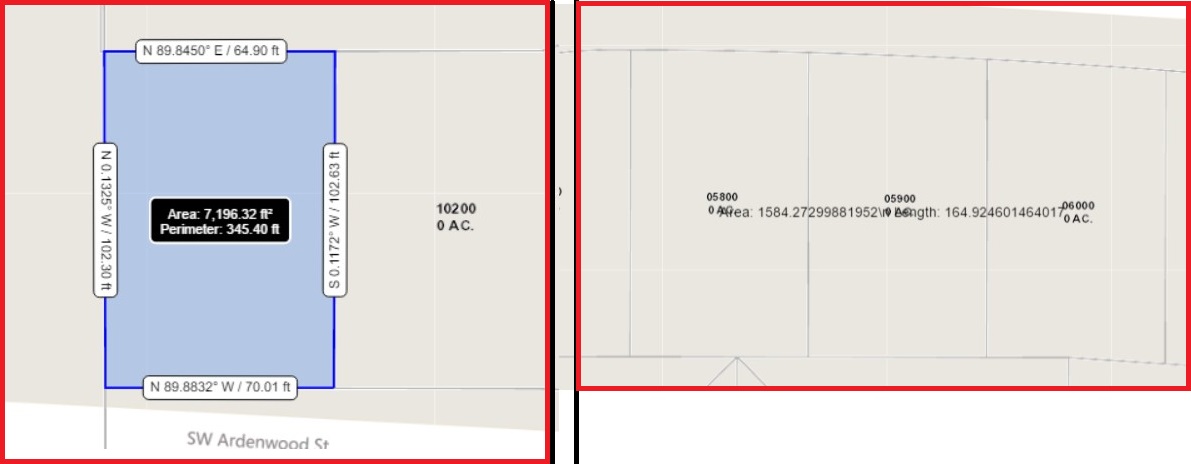 0
0 -
Hi Aaron,
Someone that knows a little more about the UpdateGraphicsLayer activity may be able to correct me, but I don't think there is. You can set the offset in the renderer section, to control where the text gets written to, but I don't see anything about orientation.
Additionally, the offset works by ofsetting from the point in the center of the polygon, meaning that the offset will be different for each polygon (unless they are all the same size).
I hope this answers your question!
Thanks,
Danny0 -
Daniel,
Thank you for the input. I will take a look at the offset. That could help us a little bit in this scenario.
Thanks Again!!
Best,
Aaron0
Please sign in to leave a comment.
Comments
4 comments