data link in subreport

I found another thread on this but the link to another forum post within it is broken. Can anyone give me some pointers on how to use data link information in a subreport?
0
-

In your main report, you add a new SubReport Control. In order to properly reference the subreport in your main report, you set the SubReport control's ReportName attribute to the name of your data link and the Tag argument to the name of your subreport rpx file.
Here's an example where I have a data link on my parcel layer called CAMAreport, and the subreport I made is called CAMAreport.rpx.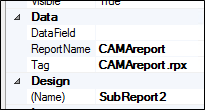
The data link and the report file don't have to have the same name, but in my experience it's a lot easier to keep track of which data links are for which supreports that way.
You set up the subreport just like you would a normal report, except you're using data fields from your data link.0 -
Thanks John.
What syntax are you using for the datafield property in the subreport? I've tried datalinkID.fieldname without success.0 -
Just use the field name in your data link. You don't need to include the data link ID because the main report gets that information from the SubReport control's ReportName property. 0
Please sign in to leave a comment.
Comments
3 comments