Map Tips with Feature Clustering

When Feature Clustering is enabled, the map tips no longer works. Any suggestions?
HTML5 2.7 GE 4.6
0
-

I justed tested feature clustering and map tips in the GVH 2.7 and it works fine for me. Can you confirm that you have map tips enabled for the layer? What browser are you using? 0 -
Strange, it is working now. One other thing I notice on mine, when a point is selected with map tips, all other points disappear. If you click view additional details all other points are still gone. Then when you close the details pane, the point stays selected and the other points don't come back. You have to click on the map for the points to come back, and again to unselect the original point. Is it like this on yours? I'm using GVH 2.7 essentials 4.6.0. This is only with feature clustering enabled. When it is not enabled the points don't disappear, however the point stays selected until you click on the map. 0 -
Yep, I'm seeing that too. It's a wonky behavior, but it is improved from past versions where the clustered points wouldn't reappear unless you refreshed the page. Maybe by the next version they'll have it all sorted out. :) 0 -

Are Map Tips meant to return all results from the cluster? Mine do not and I wonder if I've missed a configuration element.
From what I am seeing, when I click on the cluster labelled "6", I will get only one Map Tips result from the cluster (if any at all). Ideally MapTips should show the first of all six. Should it? Can it?
Thanks,
Justin0 -
Hi Justin,
A cluster of 6 features may be located all around the cluster circle, with just parts of the feature touching the circle. When you click in the cluster, you may only return features within the immediate area clicked.
If you use the identify tool and select a rectangle around the cluster, do you get 6 results? I did in my testing using the LA County sample site. The Identify shows (via a yellow circle) where the features actually are located.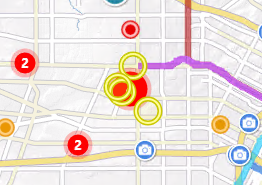
Regards,
Wayne0 -
Hi Wayne,
Thanks for your reply. What I found is by setting identifiable layers to be just the clustered layer, it did return the number of Map Tips results matching the number shown on the cluster. Based on what you've said, maybe this is a mere coincidence. But thank you for confirming I've not missed anything in configuration that would explain what I first reported.
Thanks again,Justin
0 -
I've been noticing some strange (at least it is to me) behaviour with clustered points in the 2.6.1 viewer. I have 'show maptips' turned off for all layers (1 clustered point layer, 2 polygon layers) which I expected would disable maptips completely.
However, if I click on the map (which does an identify) a blank map tip will appear. As noted in a previous reply, all other points (clustered or not) will disappear until you close the empty maptip dialog. If I disable clustering on the point layer then no maptips are shown at any scale for any layer - exactly what I would expect.
So, is this a bug with clustering in 2.6.1? Anyone know if it has been addressed in a newer version (I don't see anything in the release notes)? If this is normal behaviour for the 2.6.1 viewer, are there any workarounds to completely stop maptips from displaying without having to remove the Maptips module from the json files?0
Please sign in to leave a comment.
Comments
7 comments