Move sign-in button to home panel

With the new ability to save and add layers through layer catalog, we want to make sure users remember to sign in BEFORE they configure their map. So, we want to move the sign-in button to the home panel.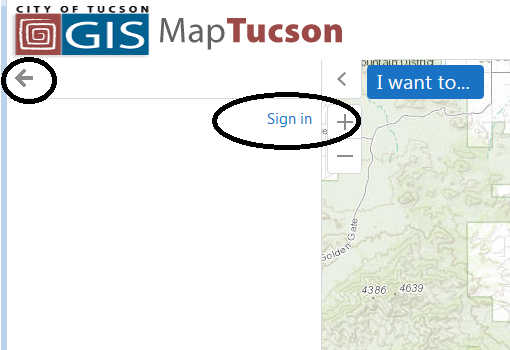
I have been partially successful, by modifying the 'desktop.js' file for the specific HTML5 viewer (v 2.7) for the site and changing the 'region' value to 'HomePanelContainerRegion' for the id: SignInView (line 231-237).
However this puts the sign in button/link in an odd spot:
It works, but is removed from the rest of the content in the home panel, and you need to click the left arrow circled above to get to the true, configured home panel.
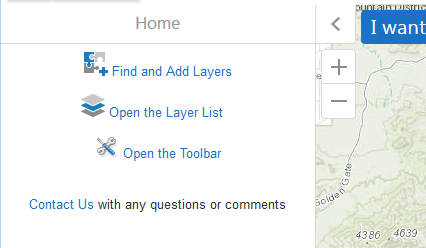
We'd like to have the sign-in button appear in this normal home panel, at the top of the items seen here:
Has anyone done this? Guessing maybe we need to work with the custom .css file?
Thanks -
Allen
0
-

We're not on GVH 2.7 yet, but I would find in the json where those existing links are (in your second screenshot) and try adding the signin button in that section. Not sure how those are set up, but it's where I would start looking. 0 -
Thanks Dan -
That was helpful - turns out you can essentially just code it kind of like a hyperlink in the home panel configuration with a little html:
<a href="command:SignIn" style="font-size: 10pt; text-align: justify;"><img src="https://servername/location/user-24.png"> yourlinktext</a>0
Please sign in to leave a comment.
Comments
2 comments