How to use DisplayCaptureGeometry on handheld?

Hello everyone. I think I'm missing something simple here, but is there some trick to using DisplayCaptureGeometry on a handheld? My workflow displays the DisplayCaptureGeometry form, but I can't figure out how to go to the map to draw a graphic. Any ideas?
Chris
0
-

You could use CaptureGeometry instead. 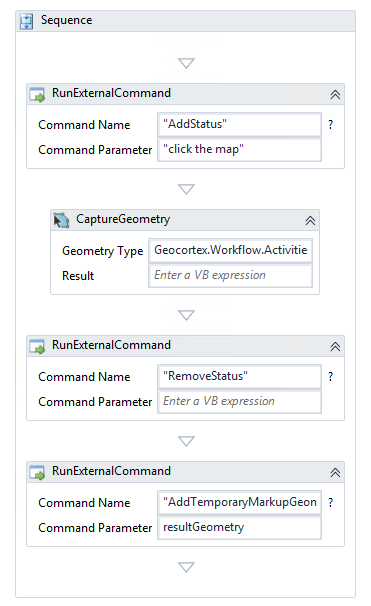
The caveat here of course is that have to choose the geometry type for the user. But a workaround would be to make a display form with buttons the user can use to determine which geometry type that feeds into a flowchart switch.0 -
Thanks John. I may have to go that route, although I must admit I'm surprised there's not a better solution. We have lots of workflows that use this command, and it will be quite a bit of work to update them all. It seems strange to me that this isn't at least documented somewhere - "This activity doesn't work on handheld devices". So much for developing workflows that work across all devices... 0
Please sign in to leave a comment.
Comments
2 comments