Can you view attachments in a map tip?

I have attachments setup on my feature class. I can view them if I click the feature and click the View Additional Details link in the map tip window.
Is it possible to add the attachment links into my map tip window? I can't seem to figure out how or if its even possible.
0
-
Hi Daniel,
Unfortunately, you cannot reference your attachments in the the maptip like you can with an attribute. However, you can run a workflow from the maptip that will display the attachment in a new tab/browser.
We also have an (https://support.geocortex.com/essentialsGSCCodeGallery?sub-nav=codegall&main-nav=essentials&#!/feedtype=SINGLE_ARTICLE_DETAIL&criteria=BESTANSWERS&id=kA4600000004EWZCA2) Attachment Manager workflow on our Support Centre that allows the user to navigate through all the attachments in the site. I know this is not what you asked for but this is just another option for viewing attachments.
I hope this helps.
Carmen0 -

The closest I've gotten is displaying an attached image. First I added a one-to-one data link to get the attachment Id, which I'll need to create my URL.
SELECT CAST(HYDRANTS__ATTACH.ATTACHMENTID AS VARCHAR) AS AttachmentId
FROM FIRE.HYDRANTS LEFT OUTER JOIN
FIRE.HYDRANTS__ATTACH ON HYDRANTS.OBJECTID = HYDRANTS__ATTACH.REL_OBJECTID
WHERE HYDRANTS.OBJECTID = @id
Then I added this to my feature description:
<img src="https://MyServer.org/arcgis/rest/services/MyMapService/MapServer/MyLayerId/{OBJECTID}/attachments/{Image.AttachmentId}?token={MapServiceToken}" width="25%"/></img>
Caveat: You can only display the first image since you can only use a one-to-one data link in the feature description.0 -
John
I wanted to send you a much delayed thank you for the code sample. I was able to grab my attachments and display them perfectly!!
Dan0 -

Hello John
I understand the query but how do I set up the data link.
I have to add a data connection but there isn't an option for a Feature Set, JSON or a web link?
Sincerely,
Michael Wallace0 -
Good question. In my use case I'm creating a data connection to the SQL enterprise geodatabase where my hydrants feature class and related attachment table exist. In other words, the data connection is connecting to the same database that my map layer is in. That needs to happen so you can use a SQL query to grab the related attachment ID directly to plug it into the img source URL in the feature description.
Also going to link this to the other related conversation:
https://support.geocortex.com/essentialsGSCForum?sub-nav=forum&main-nav=essentials&feedtype=SINGLE_QUESTION_DETAIL&dc=Geocortex_Viewer_for_HMTL5&criteria=ALLQUESTIONS&id=906f2000000fxaUAAQ0 -
Thanks John Our install of Geocortex is new so I don't think I have access to SDE yet via Geocortex. How does essentials know how to access attachments and get a link to all of them? Is this functionality built into a workflow or activity? 0 -
As far as I know all versions of Geocortex support SQL database connections (they also support Oracle and ODBC connections like Excel, CSV, and Access). The only other requirement is that you can connect to the server either with database or Windows credentials.
First, you create a new data connection and choose the type of data provider.
Then you provide the name of the database server and a username and password if you're using SQL Server Authentication (you can also use Windows Authentication).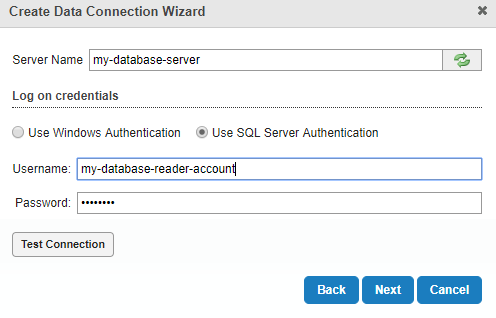
For my database connections, I set up a generic dbdatareader user on my SQL Server that I can use to access everything in it (but prevent from letting anything that connects with the credentials from having write access to anything).
Then, once your database connection is set up, you can use it to make data links to datasets in your enterprise geodatabase (including non-spatial datasets like attachment tables).0
Please sign in to leave a comment.
Comments
7 comments