How to clear workflow results in the HTML-5 Viewer

I know this has been asked but some answers are over a year old and reference depricated workflows. Here is my situation: I have an ownership search that when run can add to the current selection (for users that want to compare adjenct owners). When its run again I want to clear the results: I"ve tried serveral external commands with no luck. Here is what I want to clear:
http://i.imgur.com/6paRnp0.png

0
-
If it helps
Geocortex Essentials 4.6.2
Geocortex Viewer for HTML5 2.7.1
ArcGIS for Server 10.4.10 -

Let's see if I understand the workflow correctly:
1) Run the workflow, select a property to see the owner
2) Select additional properties to see other owners and add them to the results
3) Close the workflow
4) Run the workflow, select a property to start a new set of results
If that's the case, then you should be able to control whether or not to clear the results using a flowchart in your workflow where the first Select Features activity clears the collection, and the remainder of the workflow runs and loops back to a second Select Features activity that doesn't clear the collection.0 -
The only thing that clears the selectin is running the external commands: "ClearSelection" and "ClearHighlights." I did follow your advice and branched off the selects. The last issue I am now having is not being able to create the proper envelope to zoom to. I am not sure how to correctly build the envelope. What I'd like to do:
1. If only one thing is searched then just zoom to that extent (this works)
2. If more than one thing is searched, I'd like to keep expaning the envelope to encompass them.
-I've found ways to create lists and other comands such as GetFeasureSetExtent but I don't think I am creating or adding to the Featurset correctly.
I think my issue is not knowing hte proper way to add selected features to a featureset, do I use the union task?0 -
You can use the Clear Collection First argument on Select Features to clear the selection results. Just make sure you also assign the Collection Name so it knows which collection to clear. 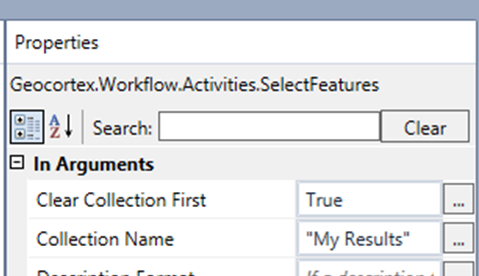
You can use a ForEach loop to add records from one feature set to another. Honestly, I don't know if that method is still the best way or is a little dated. It'd probably be worth a search on the forums for newer topics on combining feature sets.0 -
@John, I ahve the selection portion working. The "Clear Collection First" has been depricated. I'll try the for loop method and just create a list of envelopes or something like that and mess with it. 0 -
Where do you see that it's been deprecated? I'm using GE 4.6, and it's not listed as deprecated and also works just fine. 0 -

If you set it to True or False in the designer, you get a warning message it is obsolete. 0 -
Hey John and Isaac,
The Clear Collections First property has been deprecated in favour of the Combine Mode property, which is more robust (you can add features, subtract features, union features, or replace features in your feature set).
The option that is comparable to Clear Collections First would be:
Geocortex.Workflow.Activities.CombineMode.Replace
If you click in the Combine Mode text box (in the Select Features activity) a drop down will pop out showing you the available options.
I hope this helps!
Thanks,
Danny0 -
Yup, I see that now. Clearly I was looking at an old instance of Workflow Designer. 0 -
I got it all to work. I used assign to do workFlowEnvelope = workFlowEnvelope.Union(searchresultsEnveliope). This allowed to get the correct envelope when the decision exited to the zoom sequence. I will most likely upload this to this website for other sto use. 0
Please sign in to leave a comment.
Comments
10 comments