Using FindParameters object correctly

Hi,
I am trying to use the FindParameters task,
I have assigned the object (using the Assign Activity)
findParameters = new ESRI.ArcGIS.Client.Tasks.FindParameters()
and also assigned some other properties e,g.
ReturnGeometry = true
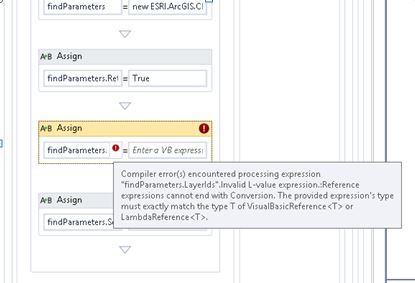
I am trying to assign findParameters.LayerIds but I get the following error when I go to the 2nd text box to assign the property
What is the correct way of assigning that property?
I am essentially trying to recreate the following Javascript code
var find = new esri.tasks.FindTask(serviceUrl);
params = new esri.tasks.FindParameters();
params.returnGeometry = true;
findParams.returnGeometry = true;
params.outSpatialReference = map.spatialReference;
params.layerIds = [selectedLyrIndex];
params.searchText = txtSearchLyr.value;

find.execute(params, COL_SrchActiveLyr.showResults);
into the workflow.Thanks
Halil
0
-

Hi Halil! The .LayerIds property of a FindParameters object is defined as Read Only in the WPF API. It's defined as a List<int>.
They way you can populate that is by using the AddToCollection<Int32> activity. The collection will be "findParameters1.LayerIds" and the item just the layer ID that you want to ad.
I hope it helps,
Alejandro0 -
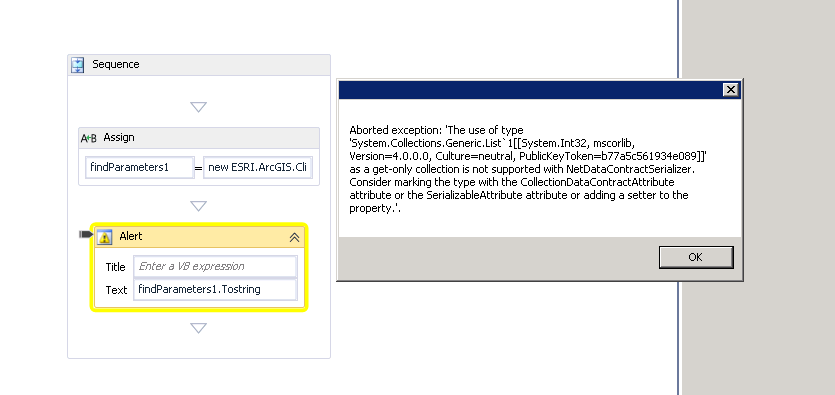
So it seems that the FindParameters object does not get assigned. In a blank workflow I have assigned
findParamters1 = new ESRI.ArcGIS.Client.Tasks.FindParameters().When I run the workflow in the simulator, i get the following error
Has anyone got any idea how to actually assign the FindParameters objects?
Thanks0 -
The error is
'The use of type 'System.Collections.Generic.List`1[[System.Int32, mscorlib, Version=4.0.0.0, Culture=neutral, PublicKeyToken=b77a5c561934e089]]' as a get-only collection is not supported with NetDataContractSerializer. Consider marking the type with the CollectionDataContractAttribute attribute or the SerializableAttribute attribute or adding a setter to the property.'.0 -
Hi Halil,
Recreating the quoted code in a workflow is going to be extremely difficult using the out-of-the-box activities.
As you've discovered, the objects used by the Find Task are not serializable. That means you would need to invoke and collect the results of the Find Task without any client activities, as any client activity would serialize the workflow state (so it can be later deserialized).
Furthermore, there is no way to declare a callback function using the out-of-the-box activities - the WPF API for the Find Task only has an asynchronous execute method, which expects to be called with a callback function.
I recommend using the Find endpoint directly with a Web Request activity - you can assemble a JSON string (which will serialize no problem) and the result is also a JSON string. JSON can be parsed out to get the results, and then converted into Graphics for display on the map.
Alternatively, you could create a custom workflow activity that wraps the Find task with the necessary code to perform the callback. I'm afraid I can't help much with that but if it's important to you, you can either post an Idea to the Ideas section of the community or open a Support case for us to investigate alternative methods to let you use the Find task.
Regards,
-Malcolm0 -
Hi Malcolm,
The find endpoint seems to be a good way, my only issue is that it does not return "features" to put directly into a featureset, but it returns a result object.
What is the best way of turning the results into a featureset, so that I can then use the Select Features activity to give the search results to the user?0 -
Hi Halil,
The response from the Find task will be a single dictionary with one item, "results", which is an array of more dictionaries that contain the things the task has found.
You could convert these to individual Graphic objects and then associate them with the layers that they belong to, by dynamically generating a FeatureSet.
Since the Find task is a single operation that can find features on multiple layers at once, it's up to you to sort out the response to associate the features with their respective layers. If the layers exist in your Site you should be able to use Select Features to associate them with the feature description that's configured in the Site.
Otherwise, you can use the inline properties of the Select Features task to do the same thing (e.g. with an anonymous featureset). Note though that selecting features that don't have a corresponding layer won't allow you to perform all possible layer actions with those features, since there's no Site layer for them to associate with.
Regards,
-Malcolm0
Please sign in to leave a comment.
Comments
6 comments